
Hard to believe — I put together my first thermostat in 2015. I started making a stat for our then holiday rental to make something idiot-proof for holiday makers (almost impossible to do incidentally as people can be REALLY thick).

I worked my way through various displays and software setups and spent altogether far too long on the subject all the way through 2020, developing a version of my stat for air-source heating (Because the Salus stat that came with the overpriced system was rubbish) and then we started the process of selling up in the UK and moving to Spain – where we have a large log burner as main source of heat.
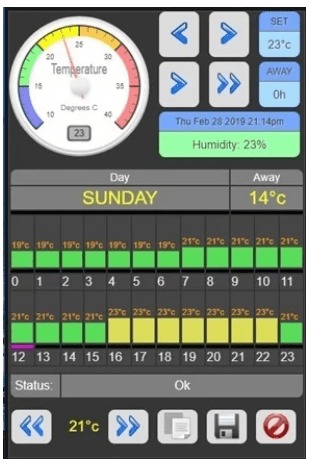
Here on the right is the 2020 version of my stat – with custom dial – which took AGES to realise and which displayed on the now defunct original Node-Red Dashboard – a change which was largely responsible for my move to Home Assistant as I could see much of my work becoming redundant in the future.
Getting all those controls (and more) precisely aligned took more time than I care to think about.
Anyway that was then, this is now.. over in Spain, as well as our log burner we also have a reversible aircon in my office and this time I went down the Home Assistant route rather than creating hardware displays or relying on old Node-Red code.
Meanwhile I’m currently back in our new UK second home for the Christmas and it occurred to me that the one thing I have no remote access to is the oil-fired central heating here in the UK. As both my wife and I have phones and tablets, it makes absolute sense to use those as means of control and information gathering, for example, to display Home Assistant panels.
The original battery-powered thermostat that came with the house is ok, but has no means of being remote-controlled. I can turn the entire boiler off remotely thanks to a smart-plug, but that’s it. A couple of days ago, I set about the task of creating a new remote thermostat. Home Assistant has both a generic thermostat and a generic scheduler built-in, which can easily be deployed to create a thermostat (but see part 2 in here). What’s missing in the standard thermostat is an “aware” mode. So I added that with a little help from Gemini. Of course now that we’re not doing holiday rentals I have no need for the secure controls of previous generations of thermostat.
I started looking up available standard smart stats and realised that there are a number of different types, some for underfloor heating that are definitely not suited to oil-powered systems – indeed quite a few variations and some at RIDICULOUS pricing. In the end, it seemed obvious with my knowledge that I should just simply create my own and this led me to looking up about current systems and when it comes to simple on/off control used in a lot of oil-powered heating systems there’s a lot of reference out there to 24V AC system control.
Indeed, I see that all the time and yet once again, on getting the meter out, I find that there is in fact a pair of wires coming from the heating system to go to the STAT contact pair, feeding 240 volts, not 24 volts, exactly the same as in our original oil-powered system all those years ago.
To be clear, the oil-powered system requires a simple isolated contact set, not a contact pair with live attached at one end as you will find on, for example, most Sonoff smart switches. I dug out my old Sonoff 4ch Pro controller which has been gathering dust for some time. Ok, so 3 of the 4 10A contact sets won’t be used for now but hey…
Clearly, this does not have a temperature sensor. So I figured I would use the Zigbee temperature sensor that I have in the kitchen. But then I thought, well, what happens if that fails? So again, with a little help from Gemini, I set up the living room temperature sensor as a backup.
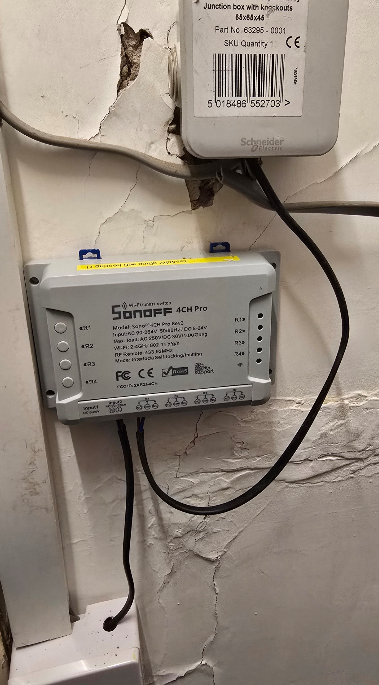
The new stat is up and in place and running in less than a day. Don’t give me nasty looks over the state of the under-stairs cupboard and it’s wiring (right)- we inherited that mess. The box at the top is simply a junction between the two-wire stat control coming in from the heating system in an out-building and the wire off on the right is the wire going into the original stat through the plasterboard wall. So, simply two wires which get shorted when heat is required. I’ve added in the thin black wire you see coming from further down up to the top box.
Meanwhile, the same Sonoff box is getting power from an existing lighting switch socket which, thankfully, has neutral down at the very bottom of the picture. I am using quite thin mains cable because the amount of current that we are talking about here is negligible. Some day I’ll rip the whole lot apart, including that mess of a wall, put a new plasterboard up, and stick a din rail up there. But for now, we have only a couple of days while we’re here over the Christmas, and I wanted to get this up and running.
I’m using first output NO contact pair (which is called R1 on the 4CH Pro unit top) on the Sonoff 4CH Pro. You can see the mechanical overrides on the left-hand side of the Sonoff. You’ve got one button for each output set. I’ve left the original thermostat in place just to be safe, but turned it to OFF mode, which in fact means it will only close it’s contacts if the temperature drops to something like 5 degrees.
I’ve set my system to come on at a much higher temperature, around 10 degrees, when in the away mode and then, of course, we have active and night modes. Being used to Spanish weather, I like to be warm, so 23°C when active and 16°C overnight.
The cables will be tied down properly, but I doubt very much whether cable ties will actually stay in that wall for very long – it’s a real mess.
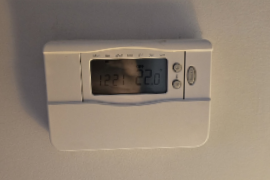
Meanwhile, on the other side of that wall, we have the living room and the original thermostat, which is a battery-powered job. Three AAA batteries have to power a little relay. I can’t imagine them lasting more than a year without being replaced. Normally, that would not be a problem, but we’re not guaranteed to come back every year – I’ve already had this problem with my Aqara battery-powered video doorbell whose batteries are good for maybe 9 months.
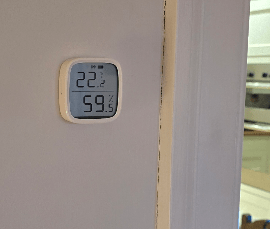
On the other hand, the Sonoff Zigbee temperature and humidity sensors I’ve used are pretty good, and their batteries will last well over a couple of years. Being Zigbee, of course, no wiring is needed, so no problem, they just simply stick to the wall.
And then we have the interface in Home Assistant, and this is what ties everything together – available wherever I or my wife happen to be thanks to the magic of Tailscale VPN.
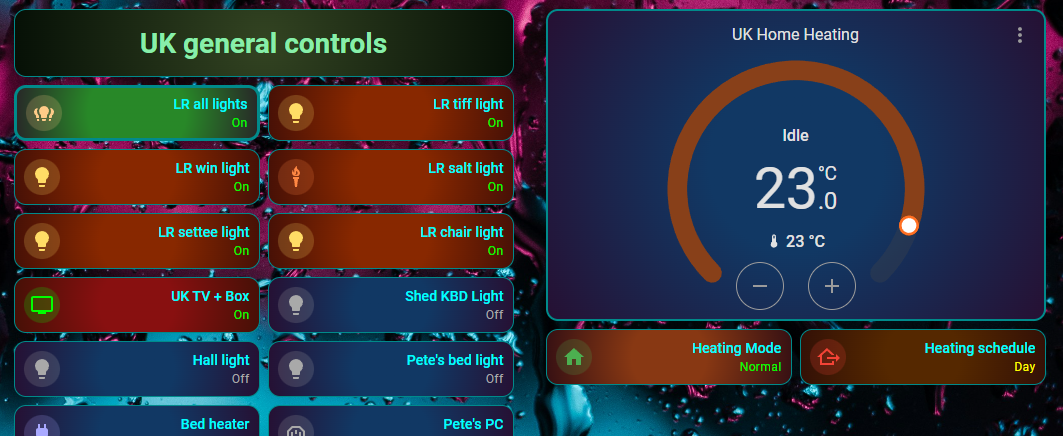
We’ve recently moved lock, stock, and barrel over to Google Home and the Google Nest. So, I don’t have voice control over all of this yet. But the next visit I’ll bring one of those little Google Nest Minis over here and simply add in voice control, for what it’s worth. I could make this stat an awful lot more sophisticated, but it simply isn’t needed. It sits on auto, or I can manually override it for a temporary temperature boost or drop, which will revert back to the scheduled auto value on the next change of schedule. There is a heating mode button to switch between normal and absent. If absent, that thermostat display goes dark and the heat control defaults to a much lower temperature. The heating schedule button on the right is simply for information to tell me that it’s on day or night mode (i.e. working). I don’t really need it, but I thought I’d put it there anyway.
The pretty colours are largely thanks to the Card-Mod add-in to Home Assistant. And so there it is, my last little mini-project of 2025.
Part 2: Before we leave…
Ok that was version 1 – on reflection the standard HA thermostat and scheduler are very limited. – needing automations, helpers etc and with limited scheduling. Version 2 then uses the HACS Versatile Thermostat and the Scheduler. See the finished product below – the schedule panel can be dynamically changed and so that is visible to admin only – i.e. me.
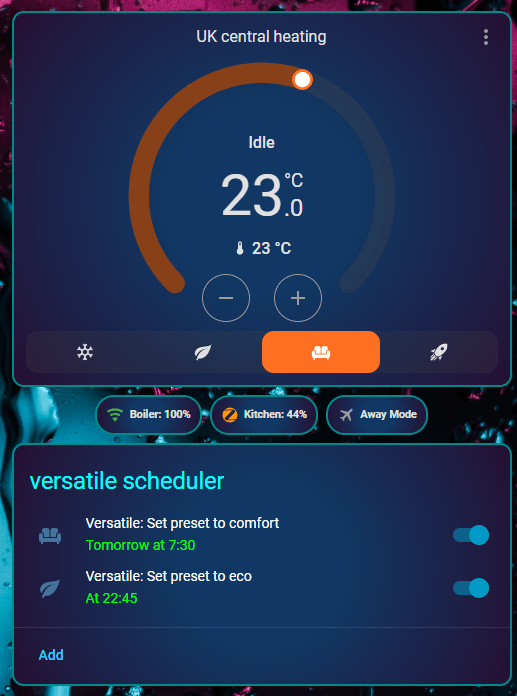
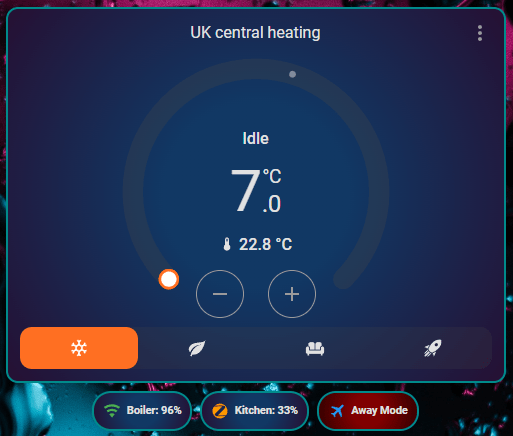
For the boiler and kitchen entities (Tasmota WiFi relay and Sonoff Zigbee temperature sensor) I had to enable the RSSI and LQI entities accordingly in the device settings in HA. Not necessary but handy to keep an eye on – especially the Zigbee battery powered device. No automations in this version of the thermostat, it’s all in the dashboard. Here are the three dashboard sections… AWAY mode is just FROST mode but made to look more obvious – see it turned ON below… This looks and works great.. Selecting eco, comfort or boost modes in the main STAT turns frost back off.
type: thermostat
entity: climate.versatile
name: UK central heating
features:
  - type: climate-preset-modes
    style: icons
    preset_modes:
      - frost
      - eco
      - comfort
      - boost
card_mod:
  style: |
    ha-card {
      border: 2px solid darkcyan;
      text-align: right;
      --card-primary-color: cyan;
      --card-secondary-color:
        {% if is_state('switch.tas4ch2_tas4_out_1', 'on') %} #00ff00
        {% else %} #a9a9a9
        {% endif %};
      background:
        {% if is_state('switch.tas4ch2_tas4_out_1', 'on') %} radial-gradient(circle, #442800 30%, #241006);
        {% else %} radial-gradient(circle, #113864 30%, #261033);
        {% endif %};
    }
That was the thermostat – now the little block of buttons…
type: custom:mushroom-chips-card
alignment: center
chips:
  - type: template
    entity: sensor.tas4ch2_rssi
    icon: mdi:wifi
    icon_color: |-
      {% set signal = states('sensor.tas4ch2_rssi') | float(0) %}
      {% if signal > 75 %} green
      {% elif signal > 45 %} orange
      {% else %} red
      {% endif %}
    content: "Boiler: {{ states('sensor.tas4ch2_rssi') }}%"
    tap_action:
      action: more-info
    card_mod:
      style: |
        ha-card {
          border: 2px solid darkcyan !important;
          background: radial-gradient(circle, #113864 30%, #261033) !important;
          --chip-background: none;
        }
  - type: template
    entity: sensor.uk_kitchen_temp_linkquality
    icon: mdi:zigbee
    icon_color: |-
      {% set lqi = states('sensor.uk_kitchen_temp_linkquality') | float(0) %}
      {% if lqi > 150 %} green
      {% elif lqi > 50 %} orange
      {% else %} red
      {% endif %}
    content: >-
      {% set lqi = states('sensor.uk_kitchen_temp_linkquality') | float(0) %}
      Kitchen: {{ (lqi / 2.55) | round(0) }}%
    tap_action:
      action: more-info
    card_mod:
      style: |
        ha-card {
          border: 2px solid darkcyan !important;
          background: radial-gradient(circle, #113864 30%, #261033) !important;
          --chip-background: none;
        }
  - type: template
    entity: climate.versatile
    icon: mdi:airplane
    icon_color: |-
      {% if is_state_attr('climate.versatile', 'preset_mode', 'frost') %}
        blue
      {% else %}
        grey
      {% endif %}
    content: Away Mode
    tap_action:
      action: call-service
      service: climate.set_preset_mode
      target:
        entity_id: climate.versatile
      data:
        preset_mode: frost
    double_tap_action:
      action: call-service
      service: climate.set_preset_mode
      target:
        entity_id: climate.versatile
      data:
        preset_mode: none
    card_mod:
      style: |
        ha-card {
          border: 2px solid darkcyan !important;
          background: {{ 'radial-gradient(circle, #800000 30%, #330000)' if is_state_attr('climate.versatile', 'preset_mode', 'frost') else 'radial-gradient(circle, #113864 30%, #261033)' }} !important;
          --chip-background: none;
        }
and finally the scheduler…
type: custom:scheduler-card
title: versatile scheduler
include:
  - climate.versatile
card_mod:
  style: |
    ha-card {
      border: 2px solid darkcyan;
      background: radial-gradient(circle, #113864 30%, #261033);
      --primary-text-color: white;
      --secondary-text-color: #00ff00;
    }
    .card-header {
      color: cyan !important;
      text-align: right;
    }
I’ve missed out the user visibility – add as required…. above you’ll see reference to 2 device entities – change to your relay device and temperature sensor. When making changes I find it extremely helpful to make a duplicate panel and work on that…
You don’t HAVE to have the full-on rotary dial, you can have a version with just a tile which when long-pressed pops up the dial version but I’ll leave that to you.
Final note: This stat automatically implements a delay (you can change it, I think the default is a minute) in actually turning the relay on and off as rapid-fire change doesn’t do oil boilers any good.
You may have noticed in here and elsewhere that I use MUSHROOM CARDS a lot – that is because the colouring and formatting abilities of standard HA cards is DREADFUL. Between the MUSHROOM CARDS and the HA-CARD add-on I can get just about any formatting I need. All freely available. Ask Gemini if in doubt.
Slightly off topic but can you tell me when you moved from node red to HA, I would like to pick up the thread in your blog, As I need to do the same thing
Thats a difficult one – you’ll see reference to Home Assistant around 2020 in the blog… but I fought it to the bitter end, along the way getting sidetracked into using ever more powerful SBCs then virtual environments – I’d say I didn’t FULLY embrace HA until I moved to HAOS – firstly on an SBC, and then eventually on a mini PC. At about the time I took an interest in Home Assistant, I was also starting to want to do more with cameras and other powerful things that were starting to make the Raspberry Pi look a little bit on the weak side. Eventually it all came together as I realised that the cost of a mini PC, which I think I spent all in about £150 on a 256GB cheap mini-PC, was not in fact any more expensive than a fully kitted out Raspberry Pi with solid state drive, and the case to go with that, and the bigger power supply, and all the rest of it. By the time I was finished, I was getting towards the £150 and at some point, I just said, “Right, that’s it. I’m going to try the mini PC. I know you can do so much more with a mini PC, but I’ve not. I’ve put here our side it does nothing more than Home Assistant, and if I want to do backups, I back up to the SPC and also to a NAS drive. So now I do backups every night and keep several nights worth, and I’ve not lost anything despite my fears that the only real way to do backups was with Raspberry Pi and RPI clone. It’s actually easier to do backups with Home Assistant, no effort at all or just automatic backups overnight. Anyway, it’s not clear cut exactly when I switched over, but if you just look up, do a search on my articles that have got Home Assistant or HA in the search, and you’ll see where I started. I haven’t entirely abandoned Node-Red of course because I want to use Google voice commands, and you have to if you want to do that with Home Assistant on its own, you’ve got to then sign up for the cloud service. I’m not doing any of that. I’ve got Node-Red running under Home Assistant as an add-on and I use the Google Home plugin for Node-Red, and I can control groups of devices via voice that way.
In fact, it’s been so successful that I’m now ditching Amazon, and I’ve bought one of the Google hubs with the screen to compliment my Google Nest hub (2nd generation), they are now available dirt cheap. So I’m thinking of getting another one of those, but in the living room at the full screen and all that is done with no ongoing monthly costs. I bought them second-hand or wallop up here in Spain and of course eBay in the UK etc.
Today I do things in Home Assistant with AI support that I couldn’t have dreamed of doing with Node-RED.
I have been using your SCRIPT for many years with node red which no w sadly doesnt work.
My question is does HA work with esp8266 devices.
Thanks Cliff
Yes, of course. I’m using a large number of ESP32 and ESP8266 devices with home assistant. I’m also using Node Red within the HAOS environment to allow use of Google voice comands. Timing in Home Assistant is more powerful than I achieved in Node Red. No brainer really but certainly a large learning curve initially.
if you talk with them with any protocol, HA supports them… mqtt is the passpartout…
Pete started migrating to docker from the script, here (my project is now archived): https://tech.scargill.net/the-transition-to-docker/
then i succeeded to convince him to try HA and he fell in love 🙂
I have a really old Eberle thermostat that’s battery operated. They have bi-stable (latching) relays, so take no current once latched. Batteries in my thermostat last 4-5 years.
Not a name I’m familiar with. Is it smart?
The one I have is quite old, it isn’t smart, it’s just a programmable thermostat, 2+5 days, 4 time zones, but it does the job. It does have a temperature lock, aka holiday mode.
I think if they had normal monostable relays the batteries wouldn’t last log at all.
Right – totally different requirements. I travel and could alight from a plane at 10pm or later to come home an hour later in winter – the last thing I need is to arrive home to a freezing cold house – Northeast of England OR inland Spain for that matter – previously we ran holiday rental – getting notice of arrival maybe half an hour before someone actually arrives after the place has been unused for days – need to turn the heat on remotely – even if we are travelling ourselves.
You really should put a fused spur box with a 3A fuse on that lead from the socket to the Sonoff box. Or put in a double socket and fit a plug to the lead.
The whole lot is fused – and I’ve never had any issues with Sonoff mains powered devices since and including the early Sonoff devices… but a breaker is not a bad idea.. I’m most likely to rip the lot out as the original layout looks like amateur night out – when we come back in January and put in proper kit but I’m on the clock now… good tip. Cheapest possible breaker box with a bit of din rail would be good.
I have a better solution which sadly will have to wait a couple of weeks now because everything is closed for Christmas, even Amazon won’t deliver until the 27th by which time I’ll be gone. Anyway, I’ll place the order to arrive when I get back. You’ll have seen in the photograph at the top a switch to turn a light on which I’ve tapped off. Well, the light actually has its own switch, so that main switch is a bit redundant.
What I’ll do is I’ll feed the light directly via choc-block inside the wall box and to the Sonoff via a replacement front end of that switch, which is a £4.00 plate from Amazon that includes a fuse and switch. It’s a 13A fuse, but I’ll take the 13A out and put a 3A fuse in.
You have to wonder why the original owner put that switch in, being as his light already has a switch in it. That’s handy that the wall box is already in place so it should be a 5 minute upgrade.