
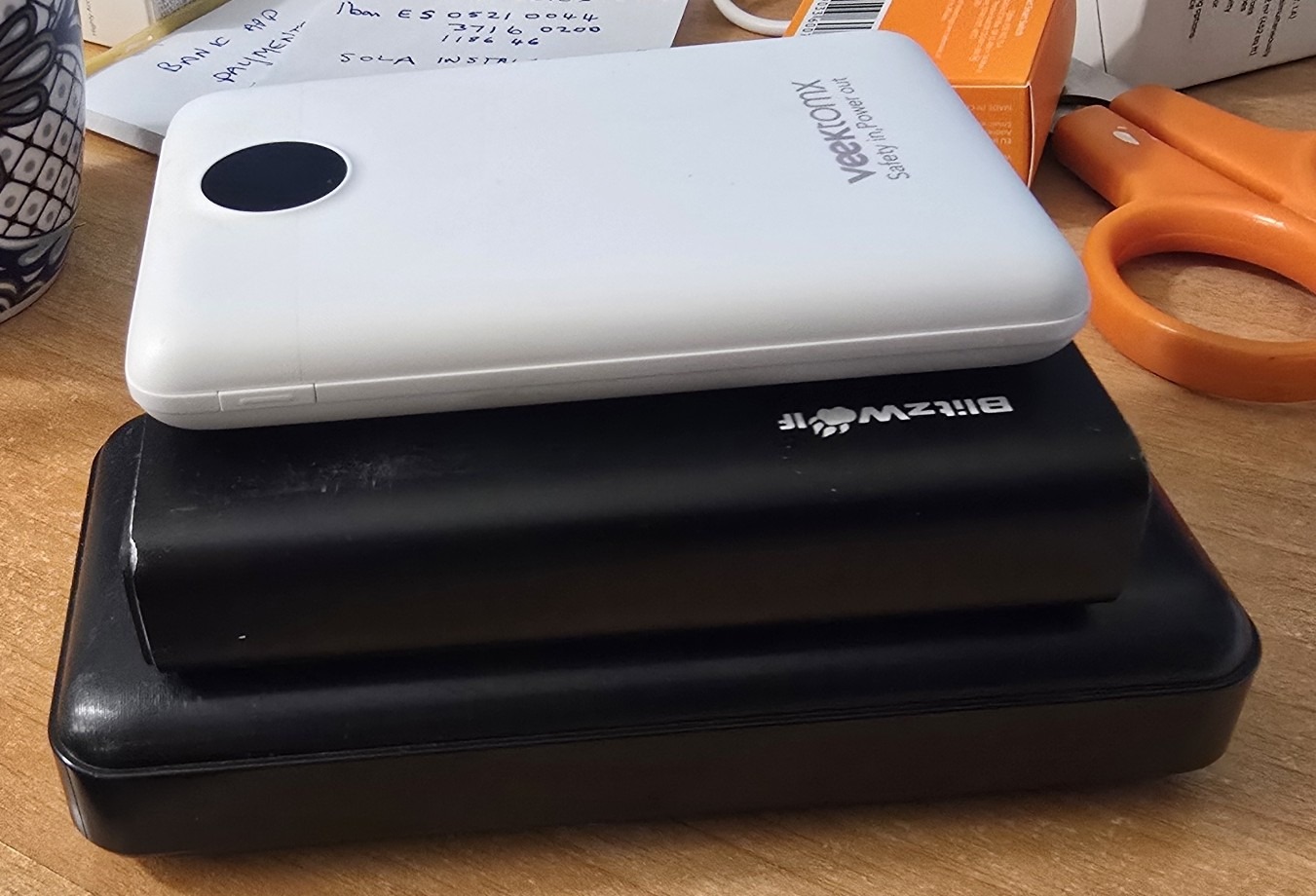
More precisely, two battery pack types. Just a little something that some of you might find useful. As you may know, we moved into a new home a little while back with no electricity so I bought a generator and an Oukitel lithium power unit (wish I’d bought a Bluetti) then added a solar panel – and typical of these Lithium power supplies / invertors, mine has a fan inside. Sometimes when the fan is running, you don’t really want that noise in your quiet living room. I put mine in the garage out of the way next to the generator (conveniently also near to the solar panel – to keep the low voltage cables short).
All very good but this morning there was so much sun that I decided not to run up the generator and the battery had, I thought, at least an hour left in it without sun and so I thought I’ll leave the sun to charge it up. Good idea, not as it turns out. After I left, the sun unexpectedly went away for a while after I left – and the battery soon became absolutely drained. I was out all morning at yoga (and coffee) and of course after a while the sun came back, which is lovely.
The only problem is that with the Oukitel and generator etc. being in the garage, I have a router that talks to the generator and the Oukitel and with that, should the output of the Oukitel output turn off I can check and turn it back on with my phone. Unfortunately the router gets its power from the Oukitel so no garage WiFi hence no remote control.
Sitting having coffee at the bar after yoga, I noticed the lack of sunshine and once the sun came back up – thought, “Well I’ll just check on the Oukitel power unit and see, just in case that absence of sun flattened the battery completely if I need to turn it back on again”. Of course my main router and Home Assistant box has its own little emergency supply and that can go on for hours in the absence of power so I can talk to everything on my phone remotely. But for the one fatal mistake, the router in the garage (not on UPS and running on 5v, not 12v) was of course dead because the power had gone off. Good job. I wasn’t away for a couple of days this time but just for the morning so by the time I came back home the fridge was still OK.
So I started looking at how I could stop this router going dead in future. I could wire all the way back from the garage, which is quite a long way( very long building), to the uninterruptible that keeps my main router going… not the best of ideas because I’m already in trouble for putting too many wires along the outside wall. The alternative, I thought, would be to get a power pack for the router that had a battery built in. The obvious solution there is those little USB battery packs that you see in the main photograph, which are used for keeping phones charged etc.
I just happen to have loads of those from various manufacturers who send me stuff to test and I bought the odd one myself. And it wasn’t until I actually came to do this test, plugging the power pack into my router and also plugging the power pack into the mains to keep it charged – that I discovered that while of course most of them will simultaneously charge and discharge, there’s a catch… if you plug the thing in to charge while it’s running, it turns the output off and you have to press the button to turn it back on, which of course you can’t do if you’re not there. Some won’t even do both charge and discharge at once – the neat white Vektomx you see in the photo being an example of the latter .
Out of all of my power packs there are only two that worked just fine with no interaction. These two will simultaneously charge and discharge and can be run completely in the absence of anybody being there.
One is a big monster called a Paidashu from Amazon. The other is a Blitzwolf. Unfortunately the part number on the latter has long since disappeared. The point of this is to bring to your attention that if you find yourself in any remotely similar situation where you need to simultaneously charge and discharge one of these little power packs without having to press any buttons, be really careful when buying. Test that it will handle both input and output at the same time without any manual intervention and if not, send it straight back to Amazon or whoever. There are one or two which will actually say in the adverts “simultaneously charge and discharge” but they won’t tell you if you have to press a button to get them to do that.
So I have a working solution but only by trial and error and I guess it will keep the router working for a few hours in the absence of power.
What I needed next was some kind of alarm sent to my phone if the power goes off so that I’m aware of it and I can switch the lithium unit output back on via my phone. Now that I have a router which will stay on even when the power goes off, I asked chatGPT to help… it suggested I check one of my Zigbee lights or a Zigbee smart plug – i.e. unplug it from the mains and if it says “unavailable” within a few minutes, I could use that to get Home Assistant to alert my phone that the power has been lost.
Let’s see – 15:48 power removed from the light bulb… 15:58 and Home Assistant developer tools still says ON and my main panel of controls says ON… No, not yet then…
7-8 minutes later – sure enough – “unavailable” as needed. Just have to have my phone alerted now… Some months ago I made a gas alert and chatGPT again came to the rescue advising on a good way to get a loud TTS alert to appear on my phone in case of dangerous levels of gas in the garage from the generator… I reminded chatGPT about this and it came up with the modified automations for Home Assistant that you see below – sensing one of my Zigbee lights becoming unavailable due to lack of power.
alias: Power Failure Alert

triggers:
  - trigger: state
    entity_id: light.ali18w_30
    to: unavailable

actions:
  - delay:
      seconds: 5

  - condition: state
    entity_id: light.ali18w_30
    state: unavailable

  - repeat:
      while:
        - condition: state
          entity_id: light.ali18w_30
          state: unavailable

      sequence:
        - action: notify.mobile_app_s24ultra_ps
          data:
            message: TTS
            data:
              ttl: 0
              priority: high
              media_stream: alarm_stream_max
              tts_text: >
                Warning. Mains electricity power failure detected.

        - delay:
            minutes: 5

mode: restart
and when the power is restored and Zigbee running again…..
alias: Power Restored Alert

triggers:
  - trigger: state
    entity_id: light.ali18w_30
    from: unavailable

actions:
  - action: notify.mobile_app_s24ultra_ps
    data:
      message: TTS
      data:
        ttl: 0
        priority: high
        media_stream: alarm_stream_max
        tts_text: >
          Mains electricity power has been restored.

mode: single
It all works wonderfully and now for a full test. I’ll disconnect the light – let’s see how long before my phone alerts me…
16:44 I pulled the plug on the Zigbee light… didn’t touch the phone or do anything else… I sat outside with the phone on mobile data only and on standby… it took 10 minutes before I got an alert – it turns out that’s down to Zigbee timeout…. in Home Assistant (in my case) Zigbee sidebar – settings – settings – availability – timeout – I reduced that from 10 (minutes) to 1 minute.
ChatGPT then recommended changing that first automation first delay from 20 seconds to 5 seconds as shown.
One last check… power removed… couple of minutes later I got the power off alert… MAGIC. Overall, not a bad solution. I could now have my phone turn the Oukitel output back on. Just a shame the generator doesn’t have such remote capability – it seems few of them do.