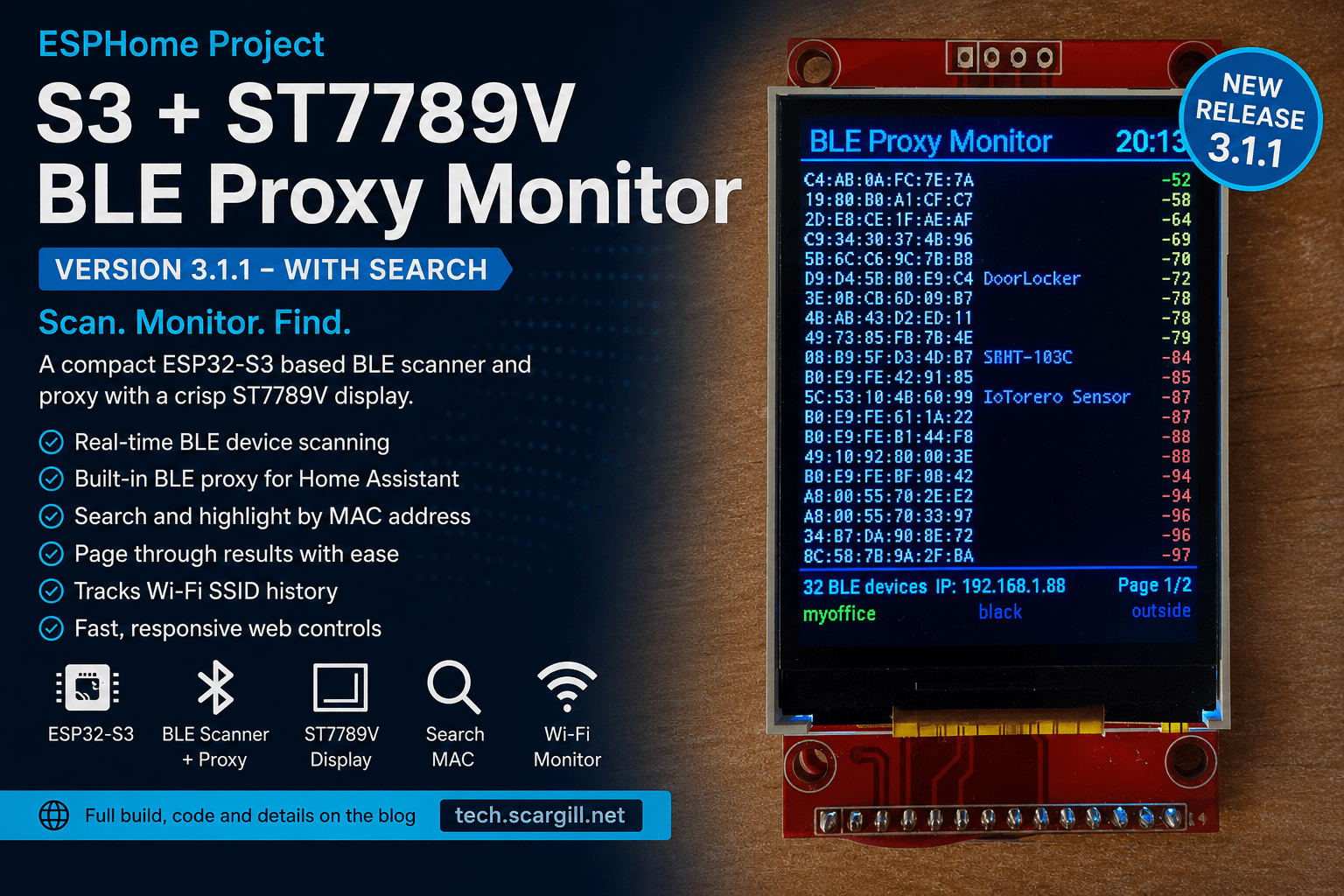
This is the latest and hopefully final ever version of my ST7789v-based ESPHome-based BLE Proxy now turned general useful BT/IP tool – is there no stopping me?
Well, I’m writing this for two reasons:
- I’ve improved the code immensely.
- This is based on the ST7789V display board commonly available on Aliexpress, coupled with a common ESP32-S3 miniature board. I’ve also added a BME280 temperature sensor, but the BME280 is entirely optional. It’s just an I2C add-on for the webUI because I had one handy.
But there’s far more to the story than this: Firstly, let me tell you – I built a little Abrobot-based BLE proxy which I blogged about earlier on, and wasted days trying to get to the bottom of why sometimes it wouldn’t connect to my Comfast router in my office, but would connect to other routers – I figured a code problem or board hardware issue – but no, It turns out that the Comfast – I’ll give you the product number — CF-WR631AXV2 — was adding a second DHCP server, if you like, to my system and confusing the little board, so I moved on to this ST7789V version and had exactly the same problem. I wasted a LOT of time because of a duff router. Anyway, I replaced the router with a small mini access point – cheap €10 job from Aliexpress and that solved the problem.
Then as if I’d not had enough issues, I went back to ESPHome to recompile the code with a little addition and all of a sudden, part of the ESPHome service that provides JavaScript was being blocked, would you believe, by the Spanish government. I’ve since written to the government in a fury, and to Comfast, and to ESPHome, to see if we can get the government to change whatever it is they’re doing to prevent illegal streaming that is interfering with legitimate use of ESPHome. Easily bypassed by VPN’ing to another country but VPNs bring their own pain.
At the end of all of that, I was so elated that I’d solved the problems that I decided this little Bluetooth monitor and proxy was worth adding a couple of last features, which I think you’ll love.
it’s just a USB-C powered ESP32-S3 board with added ST7789v display and powered by ESPHOME code, nothing more – but I’d like to think I can get a case made to carry it around… no doubt many others could do the same. I have to tell you, I’m more than excited with how this has worked out. The previous blog entry for the ST7789v version of the unit tells you ALL about what it can do. Features include keeping a history of SSIDs as I move around the house. The back of the board is shown further down.
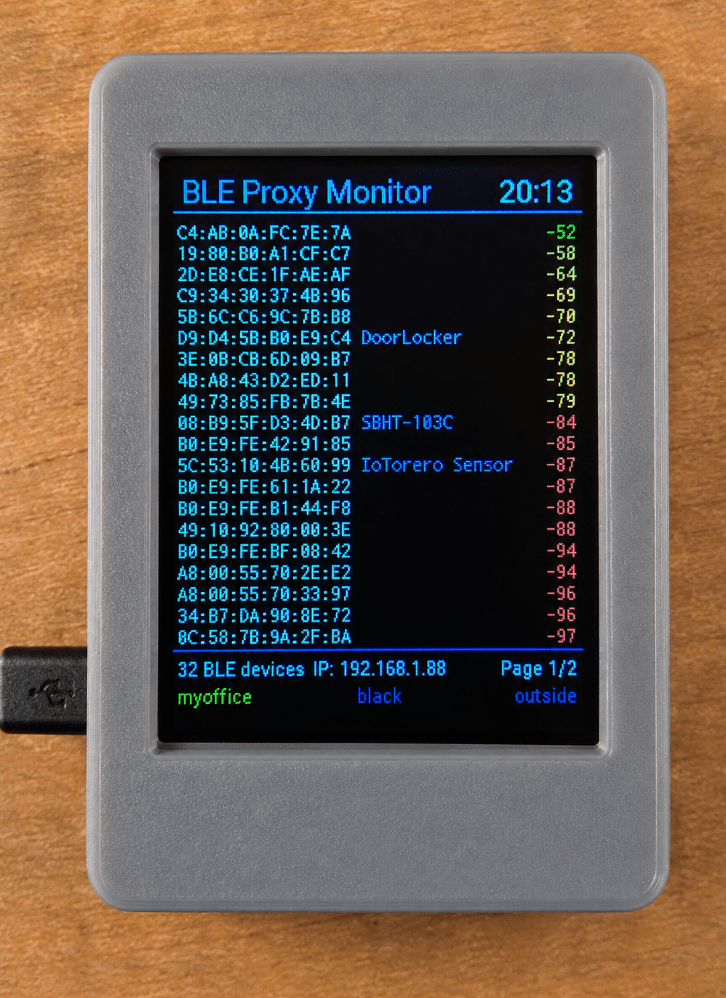
Here’s the WebUI display (PC or phone as it displays in a browser), followed by the board encased in how I envisage a 3d-printed box..

Included in this article is the full code in YAML for ESPHome. You simply need an ST7789V 240×320 TFT SPI display and an ESP32-S3 board with the (entirely) optional BME2820. All the relevant pins are detailed in the code.
If you copy this code straight out of the blog, remember to use the raw option on your screen to get the raw code without any “extras” added by WordPress. This should paste straight into a new SPHOME project – initially flashed serially and subsequently by WiFi.
# ========================================================
# S3 + st7789v BLE PROXY and Scanner with search
# August 30, 2026 Peter Scargill
# ========================================================
substitutions:
product_version: "3.1.1"
timezone: "Europe/Madrid"
esphome:
name: s3-st7789v-ble
friendly_name: S3 st7789v BLE Proxy Monitor
esp32:
board: esp32-s3-devkitc-1
framework:
type: arduino
logger:
web_server:
port: 80
version: 3
local: true
sorting_groups:
- id: control
name: "Control"
sorting_weight: 10
- id: sensors
name: "Sensors"
sorting_weight: 20
- id: diagnostic
name: "Diagnostic"
sorting_weight: 30
api:
ota:
- platform: esphome
password: ttgo_ota_password
- platform: web_server
wifi:
networks:
- ssid: !secret wifi_ssid
password: !secret wifi_password
- ssid: !secret wifi_ssid2
password: !secret wifi_password
- ssid: !secret wifi_ssid3
password: !secret wifi_password
- ssid: !secret wifi_ssid4
password: !secret wifi_password
- ssid: !secret wifi_ssid5
password: !secret wifi_password
power_save_mode: none
post_connect_roaming: true
# =========================================================
# SPI and I2C
# =========================================================
spi:
clk_pin: GPIO4
mosi_pin: GPIO6
i2c:
sda: GPIO1
scl: GPIO2
scan: true
# =========================================================
# Sensors
# =========================================================
sensor:
- platform: bme280_i2c
address: 0x77
update_interval: 30s
temperature:
name: "BME280 Temperature"
id: bme280_temperature
accuracy_decimals: 1
web_server:
sorting_group_id: sensors
sorting_weight: 10
humidity:
name: "BME280 Humidity"
id: bme280_humidity
accuracy_decimals: 1
web_server:
sorting_group_id: sensors
sorting_weight: 20
pressure:
name: "BME280 Pressure"
id: bme280_pressure
accuracy_decimals: 1
web_server:
sorting_group_id: sensors
sorting_weight: 30
- platform: wifi_signal
name: "WiFi Signal"
update_interval: 30s
web_server:
sorting_group_id: sensors
sorting_weight: 40
# =========================================================
# WIFI INFORMATION
# =========================================================
text_sensor:
- platform: wifi_info
ip_address:
name: "IP Address"
id: ip_address
entity_category: ""
web_server:
sorting_group_id: diagnostic
sorting_weight: 10
ssid:
name: "WiFi SSID"
id: wifi_ssid
entity_category: ""
on_value:
then:
- lambda: |-
if (x.empty())
return;
if (id(tracked_ssid).empty()) {
id(tracked_ssid) = x;
return;
}
if (x != id(tracked_ssid)) {
id(previous_previous_ssid) = id(previous_ssid);
id(previous_ssid) = id(tracked_ssid);
id(tracked_ssid) = x;
}
web_server:
sorting_group_id: diagnostic
sorting_weight: 40
bssid:
name: "WiFi BSSID"
entity_category: ""
web_server:
sorting_group_id: diagnostic
sorting_weight: 20
mac_address:
name: "WiFi MAC"
entity_category: ""
web_server:
sorting_group_id: diagnostic
sorting_weight: 30
# =========================================================
# CURRENT PAGE - WEB UI
# =========================================================
- platform: template
name: "Current Page"
id: current_page_display
update_interval: 1s
lambda: |-
const int MAX_DEVICES = 40;
const int ROWS_PER_PAGE = 20;
const uint32_t DEVICE_TIMEOUT = 120000;
int count = 0;
for (int i = 0; i < MAX_DEVICES; i++) {
if (!id(ble_macs)[i].empty()) {
uint32_t age = millis() - id(ble_last_seen)[i];
if (age < DEVICE_TIMEOUT) count++;
}
}
int pages = (count + ROWS_PER_PAGE - 1) / ROWS_PER_PAGE;
if (pages < 1) pages = 1;
int current = id(ble_page);
if (current >= pages) current = pages - 1;
char page_text[32];
snprintf(page_text, sizeof(page_text), "P%d/%d", current + 1, pages);
return {page_text};
web_server:
sorting_group_id: sensors
sorting_weight: 5
# =========================================================
# GLOBALS
# =========================================================
globals:
- id: ble_page
type: int
restore_value: no
initial_value: "0"
- id: ble_macs
type: std::string[40]
restore_value: no
- id: ble_names
type: std::string[40]
restore_value: no
- id: ble_rssi
type: int[40]
restore_value: no
- id: ble_last_seen
type: uint32_t[40]
restore_value: no
- id: ble_device_count
type: int
restore_value: no
initial_value: "0"
# true = NAME + MAC
# false = MAC only
- id: display_name_mode
type: bool
restore_value: yes
initial_value: "true"
# Normalised MAC search string. Empty = no highlighting.
- id: ble_mac_search
type: std::string
restore_value: no
- id: previous_ssid
type: std::string
restore_value: no
initial_value: '""'
- id: previous_previous_ssid
type: std::string
restore_value: no
initial_value: '""'
- id: tracked_ssid
type: std::string
restore_value: no
initial_value: '""'
# =========================================================
# WEB UI CONTROLS
# =========================================================
text:
- platform: template
name: "Search MAC"
id: ble_mac_search_text
mode: text
optimistic: true
restore_value: no
web_server:
sorting_group_id: control
sorting_weight: 10
button:
# -------------------------------------------------------
# CONFIRM SEARCH
# -------------------------------------------------------
- platform: template
name: "Confirm Search"
icon: "mdi:magnify"
web_server:
sorting_group_id: control
sorting_weight: 20
on_press:
- lambda: |-
std::string s = id(ble_mac_search_text).state;
std::string cleaned;
for (char c : s) {
if (c != ':' && c != ' ' && c != '-') {
cleaned += (char)tolower((unsigned char)c);
}
}
id(ble_mac_search) = cleaned;
id(ble_page) = 0;
- component.update: ble_display
# -------------------------------------------------------
# HOME PAGE
# -------------------------------------------------------
- platform: template
web_server:
sorting_group_id: control
sorting_weight: 30
name: "Home Page"
icon: "mdi:home"
on_press:
- lambda: |-
id(ble_page) = 0;
- component.update: ble_display
- component.update: current_page_display
# -------------------------------------------------------
# PREVIOUS PAGE
# -------------------------------------------------------
- platform: template
web_server:
sorting_group_id: control
sorting_weight: 40
name: "Previous Page"
icon: "mdi:chevron-left"
on_press:
- lambda: |-
const int MAX_DEVICES = 40;
const int ROWS_PER_PAGE = 20;
const uint32_t DEVICE_TIMEOUT = 120000;
int count = 0;
for (int i = 0; i < MAX_DEVICES; i++) {
if (!id(ble_macs)[i].empty()) {
uint32_t age =
millis() - id(ble_last_seen)[i];
if (age < DEVICE_TIMEOUT) {
count++;
}
}
}
int pages =
(count + ROWS_PER_PAGE - 1) /
ROWS_PER_PAGE;
if (pages < 1) {
pages = 1;
}
id(ble_page)--;
if (id(ble_page) < 0) {
id(ble_page) = pages - 1;
}
- component.update: ble_display
- component.update: current_page_display
# -------------------------------------------------------
# NEXT PAGE
# -------------------------------------------------------
- platform: template
web_server:
sorting_group_id: control
sorting_weight: 60
name: "Next Page"
icon: "mdi:chevron-right"
on_press:
- lambda: |-
const int MAX_DEVICES = 40;
const int ROWS_PER_PAGE = 20;
const uint32_t DEVICE_TIMEOUT = 120000;
int count = 0;
for (int i = 0; i < MAX_DEVICES; i++) {
if (!id(ble_macs)[i].empty()) {
uint32_t age =
millis() - id(ble_last_seen)[i];
if (age < DEVICE_TIMEOUT) {
count++;
}
}
}
int pages =
(count + ROWS_PER_PAGE - 1) /
ROWS_PER_PAGE;
if (pages < 1) {
pages = 1;
}
id(ble_page)++;
if (id(ble_page) >= pages) {
id(ble_page) = 0;
}
- component.update: ble_display
- component.update: current_page_display
# =========================================================
# DISPLAY PAUSE SWITCH
# ON = PAUSED
# OFF = RUNNING
# =========================================================
switch:
- platform: template
web_server:
sorting_group_id: control
sorting_weight: 5
name: "Pause Display"
id: display_pause_switch
icon: "mdi:pause-circle"
optimistic: true
restore_mode: ALWAYS_OFF
turn_on_action:
- component.suspend: ble_display
turn_off_action:
- component.resume: ble_display
- component.update: ble_display
# =========================================================
# BLE TRACKER
# =========================================================
esp32_ble_tracker:
scan_parameters:
interval: 1100ms
window: 1100ms
active: true
on_ble_advertise:
then:
- lambda: |-
const int MAX_DEVICES = 40;
const uint32_t DEVICE_TIMEOUT = 120000;
char mac_buffer[18];
x.address_str_to(mac_buffer);
ESP_LOGI("BLE", "Found: %s %s RSSI: %d",
mac_buffer,
x.get_name().c_str(),
x.get_rssi());
std::string mac = mac_buffer;
std::string name = x.get_name();
int rssi = x.get_rssi();
uint32_t now = millis();
// =================================================
// FIND EXISTING DEVICE
// =================================================
int found = -1;
for (int i = 0; i < MAX_DEVICES; i++) {
if (id(ble_macs)[i] == mac) {
found = i;
break;
}
}
// =================================================
// FIND EMPTY SLOT
// =================================================
if (found < 0) {
for (int i = 0; i < MAX_DEVICES; i++) {
if (id(ble_macs)[i].empty()) {
found = i;
break;
}
}
}
// =================================================
// IF FULL, REPLACE OLDEST INACTIVE DEVICE
// =================================================
if (found < 0) {
uint32_t oldest_time = 0xFFFFFFFFUL;
int oldest_slot = -1;
for (int i = 0; i < MAX_DEVICES; i++) {
uint32_t age =
now - id(ble_last_seen)[i];
if (age >= DEVICE_TIMEOUT &&
id(ble_last_seen)[i] < oldest_time) {
oldest_time = id(ble_last_seen)[i];
oldest_slot = i;
}
}
if (oldest_slot >= 0) {
found = oldest_slot;
}
}
// =================================================
// STORE DEVICE
// =================================================
if (found >= 0) {
id(ble_macs)[found] = mac;
id(ble_names)[found] = name;
id(ble_rssi)[found] = rssi;
id(ble_last_seen)[found] = now;
}
// =================================================
// COUNT ACTIVE DEVICES
// =================================================
int count = 0;
for (int i = 0; i < MAX_DEVICES; i++) {
if (!id(ble_macs)[i].empty()) {
uint32_t age =
now - id(ble_last_seen)[i];
if (age < DEVICE_TIMEOUT) {
count++;
}
}
}
id(ble_device_count) = count;
# =========================================================
# FONTS
# =========================================================
font:
- file: "gfonts://Inconsolata"
id: font_row
size: 12
- file: "gfonts://Roboto"
id: font_title
size: 18
- file: "gfonts://Roboto"
id: font_small
size: 11
# =========================================================
# DISPLAY
#
# ILI9341
# Physical resolution: 240 x 320
# Portrait
#
# X = 0 ... 239
# Y = 0 ... 319
# =========================================================
display:
- platform: mipi_spi
model: st7789v
id: ble_display
dc_pin: GPIO5
reset_pin: GPIO8
cs_pin: GPIO7
invert_colors: false
data_rate: 10MHz
buffer_size: 25%
rotation: 0
update_interval: 1s
lambda: |-
// =================================================
// DISPLAY DIMENSIONS
// =================================================
const int SCREEN_WIDTH = 240;
const int SCREEN_HEIGHT = 320;
const int RIGHT_EDGE = SCREEN_WIDTH - 1;
// =================================================
// LAYOUT
// =================================================
const int HEADER_Y = 5;
const int HEADER_LINE_Y = 27;
const int FIRST_Y = 32;
const int LINE_HEIGHT = 12;
const int FOOTER_LINE_Y = 274;
const int FOOTER_Y = 278;
const int SSID_FOOTER_Y = 293;
const int ROWS_PER_PAGE = 20;
// =================================================
// COLOURS
// =================================================
auto black = Color(0, 0, 0);
auto white = Color(255, 255, 255);
auto cyan = Color(0, 255, 255);
auto blue = Color(0, 120, 255);
auto green = Color(0, 255, 0);
auto yellow = Color(255, 255, 0);
auto orange = Color(255, 165, 0);
auto red = Color(255, 30, 30);
auto purple = Color(200, 150, 255);
auto dark_red = Color(220, 0, 0);
auto grey = Color(150, 150, 150);
it.fill(black);
// =================================================
// HEADER
// =================================================
it.print(
5,
HEADER_Y,
id(font_title),
blue,
"BLE Proxy Monitor"
);
it.strftime(
RIGHT_EDGE - 4,
HEADER_Y,
id(font_title),
cyan,
TextAlign::TOP_RIGHT,
"%H:%M",
id(sntp_time).now()
);
it.line(
0,
HEADER_LINE_Y,
RIGHT_EDGE,
HEADER_LINE_Y,
blue
);
// =================================================
// BUILD ACTIVE DEVICE LIST
// =================================================
const int MAX_DEVICES = 40;
int order[MAX_DEVICES];
int count = 0;
for (int i = 0; i < MAX_DEVICES; i++) {
if (!id(ble_macs)[i].empty()) {
uint32_t age =
millis() - id(ble_last_seen)[i];
if (age < 120000) {
order[count++] = i;
}
}
}
// =================================================
// SORT STRONGEST RSSI FIRST
// =================================================
for (int i = 0; i < count - 1; i++) {
for (int j = i + 1; j < count; j++) {
if (id(ble_rssi)[order[j]] >
id(ble_rssi)[order[i]]) {
int temp = order[i];
order[i] = order[j];
order[j] = temp;
}
}
}
// =================================================
// PAGE CALCULATION
// =================================================
int pages =
(count + ROWS_PER_PAGE - 1) /
ROWS_PER_PAGE;
if (pages < 1) {
pages = 1;
}
// No physical page buttons on this S3 yet.
// Display page 1 for now.
int current_page = id(ble_page);
int start =
current_page * ROWS_PER_PAGE;
int end =
start + ROWS_PER_PAGE;
if (end > count) {
end = count;
}
// =================================================
// DEVICE ROWS
// =================================================
int y = FIRST_Y;
for (int n = start; n < end; n++) {
int i = order[n];
// -------------------------------------------------
// MAC
// -------------------------------------------------
std::string mac =
id(ble_macs)[i];
// -------------------------------------------------
// MAC SEARCH / HIGHLIGHT
// Case-insensitive, ignores :, spaces and -
// Partial matches are supported.
// -------------------------------------------------
std::string mac_compare;
for (char c : mac) {
if (c != ':' && c != ' ' && c != '-') {
mac_compare += (char)tolower((unsigned char)c);
}
}
bool mac_match =
!id(ble_mac_search).empty() &&
mac_compare.find(id(ble_mac_search)) != std::string::npos;
if (mac_match) {
// Red background behind the MAC, white text.
it.filled_rectangle(
1,
y + 2,
105,
11,
dark_red
);
}
it.print(
2,
y,
id(font_row),
mac_match ? white : white,
mac.c_str()
);
// -------------------------------------------------
// NAME
// -------------------------------------------------
std::string name =
id(ble_names)[i];
if (id(display_name_mode) &&
!name.empty()) {
// Keep the name clear of RSSI.
if (name.length() > 17) {
name = name.substr(0, 17);
}
it.print(
110,
y,
id(font_row),
purple,
name.c_str()
);
}
// -------------------------------------------------
// RSSI
// -------------------------------------------------
Color rssi_color;
if (id(ble_rssi)[i] >= -55) {
rssi_color = green;
} else if (id(ble_rssi)[i] >= -65) {
rssi_color = yellow;
} else if (id(ble_rssi)[i] >= -79) {
rssi_color = orange;
} else {
rssi_color = red;
}
char rssi_text[8];
snprintf(
rssi_text,
sizeof(rssi_text),
"%d",
id(ble_rssi)[i]
);
it.print(
RIGHT_EDGE - 2,
y,
id(font_row),
rssi_color,
TextAlign::TOP_RIGHT,
rssi_text
);
y += LINE_HEIGHT;
}
// =================================================
// FOOTER
// =================================================
it.line(
0,
FOOTER_LINE_Y,
RIGHT_EDGE,
FOOTER_LINE_Y,
blue
);
// -------------------------------------------------
// TOP STATUS LINE
// BLE count | current IP | page
// -------------------------------------------------
char count_text[32];
snprintf(
count_text,
sizeof(count_text),
"%d BLE devices",
count
);
it.print(
2,
FOOTER_Y,
id(font_small),
cyan,
count_text
);
std::string current_ip = id(ip_address).state;
if (current_ip.empty() || current_ip == "0.0.0.0")
current_ip = "----";
std::string ip_display = "IP: " + current_ip;
it.print(
120,
FOOTER_Y,
id(font_small),
cyan,
TextAlign::TOP_CENTER,
ip_display.c_str()
);
char page_text[32];
snprintf(
page_text,
sizeof(page_text),
"Page %d/%d",
current_page + 1,
pages
);
it.print(
RIGHT_EDGE - 2,
FOOTER_Y,
id(font_small),
cyan,
TextAlign::TOP_RIGHT,
page_text
);
// -------------------------------------------------
// SSID HISTORY LINE
// -------------------------------------------------
std::string ssid_oldest = id(previous_previous_ssid);
std::string ssid_previous = id(previous_ssid);
std::string ssid_current = id(tracked_ssid);
// Only current SSID known
// Current = GREEN, LEFT
if (ssid_oldest.empty() && ssid_previous.empty()) {
if (!ssid_current.empty()) {
it.print(
2,
SSID_FOOTER_Y,
id(font_small),
green,
ssid_current.c_str()
);
}
}
// Two SSIDs known
// Current = GREEN, LEFT
// Previous = YELLOW, CENTRE
else if (ssid_oldest.empty()) {
if (!ssid_current.empty()) {
it.print(
2,
SSID_FOOTER_Y,
id(font_small),
green,
ssid_current.c_str()
);
}
if (!ssid_previous.empty()) {
it.print(
120,
SSID_FOOTER_Y,
id(font_small),
grey,
TextAlign::TOP_CENTER,
ssid_previous.c_str()
);
}
}
// Three SSIDs known
// Current = GREEN, LEFT
// Previous = YELLOW, CENTRE
// Oldest = YELLOW, RIGHT
else {
if (!ssid_current.empty()) {
it.print(
2,
SSID_FOOTER_Y,
id(font_small),
green,
ssid_current.c_str()
);
}
it.print(
120,
SSID_FOOTER_Y,
id(font_small),
grey,
TextAlign::TOP_CENTER,
ssid_previous.c_str()
);
it.print(
RIGHT_EDGE - 2,
SSID_FOOTER_Y,
id(font_small),
grey,
TextAlign::TOP_RIGHT,
ssid_oldest.c_str()
);
}
# =========================================================
# TIME
# =========================================================
time:
- platform: sntp
id: sntp_time
timezone: ${timezone}
At this point you may be wondreing if I’m going to give more detail – coming up…
But before delving into this version complete with ALL CODE ABOVE… a QUICK backtrack for anyone not up to speed on BLE Proxies. Go straight to The Projects if you’re already up to speed on BLE, ESPHOME etc. But first.. there is a later and improved version of the st7789v code in a later article you likely dont want to miss.
What is BLE?

BLE (Bluetooth Low Energy) is a low-power version of Bluetooth designed for small devices such as sensors, watches, beacons and trackers. Devices can periodically broadcast small amounts of information without maintaining a continuous Bluetooth connection.
What is a BLE proxy?
A BLE proxy is a network-connected device, such as an ESP32, that listens for nearby BLE devices and passes what it hears over Wi-Fi to Home Assistant.
This is SO useful because Home Assistant (HA) doesn’t need to be physically close to the Bluetooth device. You can put several inexpensive ESP32 BLE proxies around the house or office, and together they extend HA’s Bluetooth coverage.
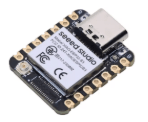
In this project, the ESP32-S3 is both the BLE listener and the display: it scans for nearby BLE devices, shows what it finds on the TFT display, and simultaneously makes those devices available to HA over Wi-Fi. A simple ESP32 with no display does the job of a basic BLE proxy as do some ESP32-based smart devices
ESPHOME is a free framework for developing code for ESP8266 and ESP32-based projects. Historically I preferred Tasmota and have made and used countless devices with this free software at their base. At first, ESPHOME was clumsy and difficult to get your head around. Today is it well developed, can optionally work within HA and has drivers for many, many devices.
The basic BLE Proxy
The starting point is the ESPHome Bluetooth proxy. This is remarkably simple: the ESP32-S3’s built-in Bluetooth Low Energy radio listens for nearby BLE devices and passes the information back to HA over the network. ESPHome handles the Bluetooth communication, networking and Home Assistant connection for us, so there is no Bluetooth programming required.
esp32_ble_tracker:

bluetooth_proxy:
That’s essentially the heart of the BLE monitor. Once those two components are enabled, the ESP32 can discover nearby BLE devices and act as a Bluetooth proxy for Home Assistant. It is worth remembering that the ESP32 isn’t doing anything particularly clever with the BLE data itself — ESPHome does the hard work.
Adding the display
The next part is the TFT display. ESPHome already knows how to drive a large range of display controllers, so rather than writing SPI routines ourselves, we simply specify the controller, the pins and the orientation.
For the ST7789V display used here, the relevant section tells ESPHome which GPIOs are connected to SPI clock, data, chip select, reset and data/command. ESPHome then provides a display object which we can draw on from a simple C++ lambda.
That means displaying text, lines and colours becomes almost trivial compared with writing a display driver from scratch.
Displaying the BLE information
The BLE results can then be sorted and formatted before being drawn onto the TFT. The code takes the discovered MAC addresses, checks for names where we have them, adds the RSSI value and displays the resulting list a page at a time.
The important point is that we aren’t having to write the BLE discovery code. ESPHome supplies the BLE device information; our code is really just concerned with deciding how we want that information presented.
The Entirely Optional BME280
Adding the environmental sensor (just for the sake of it) is similarly painless. The BME280 is a very cheap, accurate and widely available temperature, humidity and pressure sensor and is connected using the ESP32’s I²C bus, in this case with GPIO1 as SDA and GPIO2 as SCL. the ESP32 will let you use any general purpose IO pins for this purpose. I generally ignore all pins except for vcc, gnd, SDA and SCL.
i2c:
  sda: GPIO1
  scl: GPIO2
ESPHome takes care of the I²C communication and turns the BME280’s measurements into Home Assistant sensors. Temperature, humidity and atmospheric pressure therefore appear automatically in both Home Assistant and the project’s ESPHome web interface.
The web interface
Finally, adding the ESPHome web server gives the device its own browser-based control panel:
web_server:
  port: 80
This is particularly useful here because it means the monitor can be controlled without adding physical buttons. The web interface can provide controls for changing pages, pausing and resuming the display, and other functions we have added to the monitor.
It also means the device can be controlled from a phone or tablet without HA being involved at all.
And that’s really the attraction of ESPHome
What would traditionally have required a considerable amount of embedded programming — BLE scanning, Wi-Fi networking, a web server, an SPI TFT driver, I²C sensor communication and Home Assistant integration — becomes a collection of relatively small ESPHome configuration sections.
The interesting part of the project is therefore not writing the low-level hardware drivers. ESPHome has already done that. We’re simply joining those building blocks together and adding the small amount of code needed to turn the raw information into something useful on the display.
And now…..
The Projects
I was more than happy at first with the progress of my Abrobot-based BLE proxy device… which works JUST FINE… but I wanted MORE. The next step would be to use a pair of TTGO boards I had lying around… all did their job fine but THEN I started to see the limitations of these older ESP32s used in the TTGO boards – lack of RAM prevented me from enjoying these projects to the full – with the display taking up lots of code, I seemed to be able to have WebUI OR MQTT – and as for WiFi OTA…. I started to hit barriers..
The next and essentially final major step would be an ILI9341-based board using an ESP32-S3 which has LOADS more RAM. That’s all documented in the blog – but THEN I found I had a couple of st7789v displays lying around – and took the code, only VERY slightly modified (but adding improvements all the way including a totally un-necessary BME280 temperature, humidity and pressure chip).
The result – the board you see here, which will work stand-alone as a BLE proxy AND pocket scanner – and optionally plug into a USB-C-equipped phone so I can wander around the house checking my bluetooth connectivity using the display for output and my phone (using the webUI of the project in a browser) to monitor the bluetooth signals – filter specific signals and also just for fun (a few minutes work to add) check temperature, humidity and pressure… and… well, by the time you read this I’ll likely have added more…. I’m having great fun.
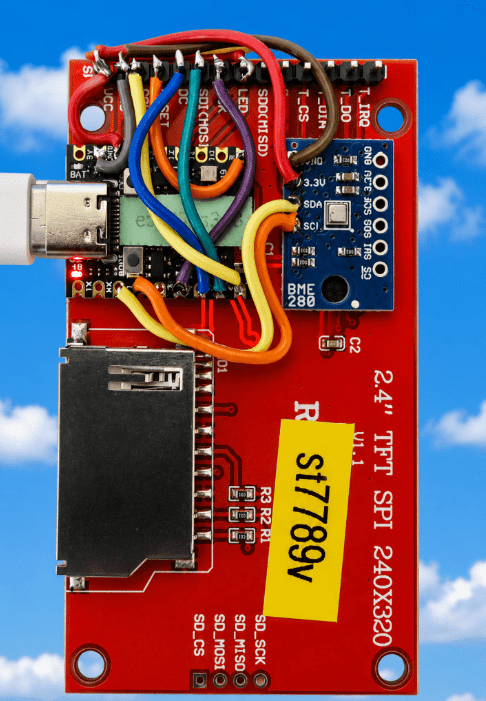
You have photos of the front and back here… and below – the YAML code for ESPHOME – only modify the WiFi access point info (near the start) and time location (at the end) CAREFULLY. The usual scenario here is to assemble and check the board + ESP32-S3 + BME280 if you want that in – then plug the board into a PC USB port, make a new ESPHOME project using this code…. save, flash using USB – then subsequently any mods you can flash over WiFi.
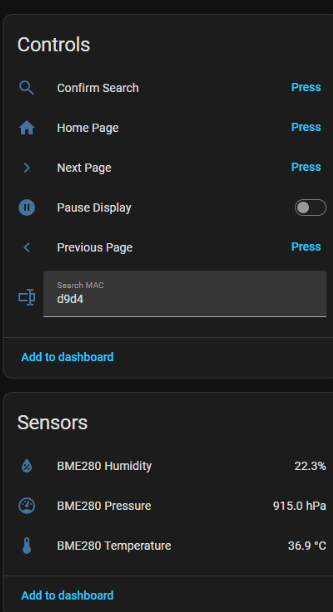
The ESPHOME WebUI here (no port settings, just go in a browser to the IP address of the project)…
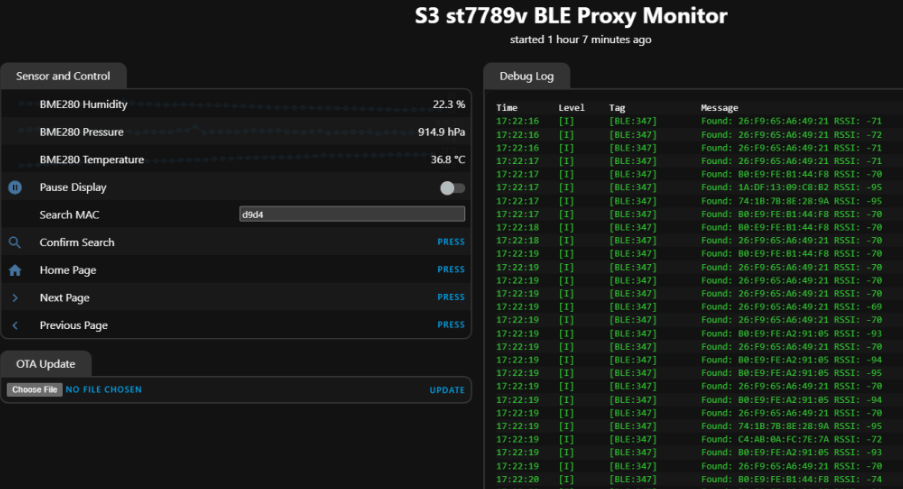
Note the MAC filter search box above – with case-insensitivity, partial-MAC ability and lax attitude toward colons.
and finally – what this looks like in HA (Home Assistant) if you’re using that…