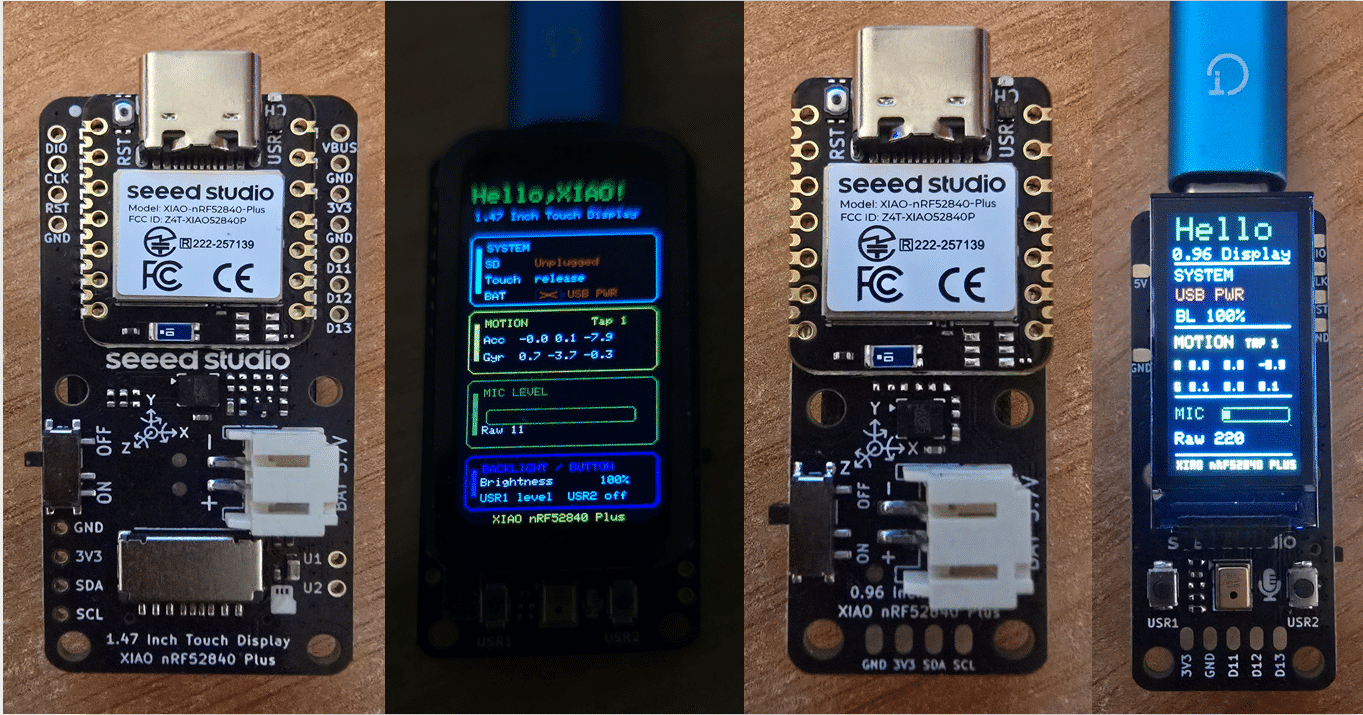
I’m going to touch VERY briefly on two boards I just picked up from Seeed Studio. Very briefly because I thought they’d be running on ESP32 chips – but they aren’t – I guess the giveaway is in the name (nRF52840)
Here they are, the demos are very pretty indeed but as my go-to development software is ESPHOME it’ll be a while before I can familiarize myself with the tools to do something with these.
Both boards (they have 3 different sizes) are very similar but for the 1.47″ Touch display versus the 0.96″ display on the smaller board. Both have connectors for 3v7 rechargeable batteries and both have USB-connectors for charging or no-battery operation.
Both boards fully support their full colour displays, built-in movement and gyro sensors, battery status, backlight control and microphone – and the demos with which the boards come ready-fitted do a great job of showing off the sensors. Both have TAP sensors though I could not seem to get consistent operation there- everything else was fine.
One important point I nearly missed: the XIAO nRF52840 Plus is not a Wi-Fi device. The nRF52840 provides Bluetooth/Bluetooth Low Energy (BLE) connectivity, but there is no Wi-Fi hardware on the board.
That means these boards are rather different from the ESP32-based XIAO boards I’ve been using recently. In particular, they can’t provide the Wi-Fi-based features I’m used to with ESPHome, such as a web interface, network connectivity or OTA updates.
It seems however thst by msking use of one of my BLE proxies I should be able to get the Xiao-nRF52850-Plus boards talking to Home Assistant – time will tell.
And so it sis only moments later. Safe in the knowledge that the demo code is available on the Seeed site, that gave me the confidence to try a little trick that CHATGPT suggested – putting in the simplest possible arduino code into the smaller of the two boards. I started up the Arduino IDE on my PC and added this link below for the Seeed boards.
Arduino IDE – File Preferences – Additional Boards Manager – I had a list of nweline separated values in there already and added this: https://files.seeedstudio.com/arduino/package_seeeduino_boards_index.json
I then started off a newArduino project – and installed “Seeeed NRF52 Boards by Seeed Studio”, made suer the smaller board was plugged into my PC USB (I have a hub with several available connections) – picked the right serial port and selected Seeed XIAO nRF52840 Plus in the board list.
I replaced the dummy sketch in the new sketch with:
#include <bluefruit.h>

void setup() {
  Serial.begin(115200);

  Bluefruit.begin();
  Bluefruit.setName("XIAO-096-PETE");

  Bluefruit.Advertising.addFlags(BLE_GAP_ADV_FLAGS_LE_ONLY_GENERAL_DISC_MODE);
  Bluefruit.Advertising.addTxPower();
  Bluefruit.Advertising.addName();

  Bluefruit.Advertising.restartOnDisconnect(true);
  Bluefruit.Advertising.setInterval(32, 244);
  Bluefruit.Advertising.start(0);
}

void loop() {
  delay(1000);
}
That’s it, I didnt have to install anything else – I’ve not missed any steps here.. I then hit the UPLOAD option in the IDE (no need to do compile first – that gets done automatically before uploading).
When that was done – I made sure one of my BLE proxies Monitors was running and noticed THIS:
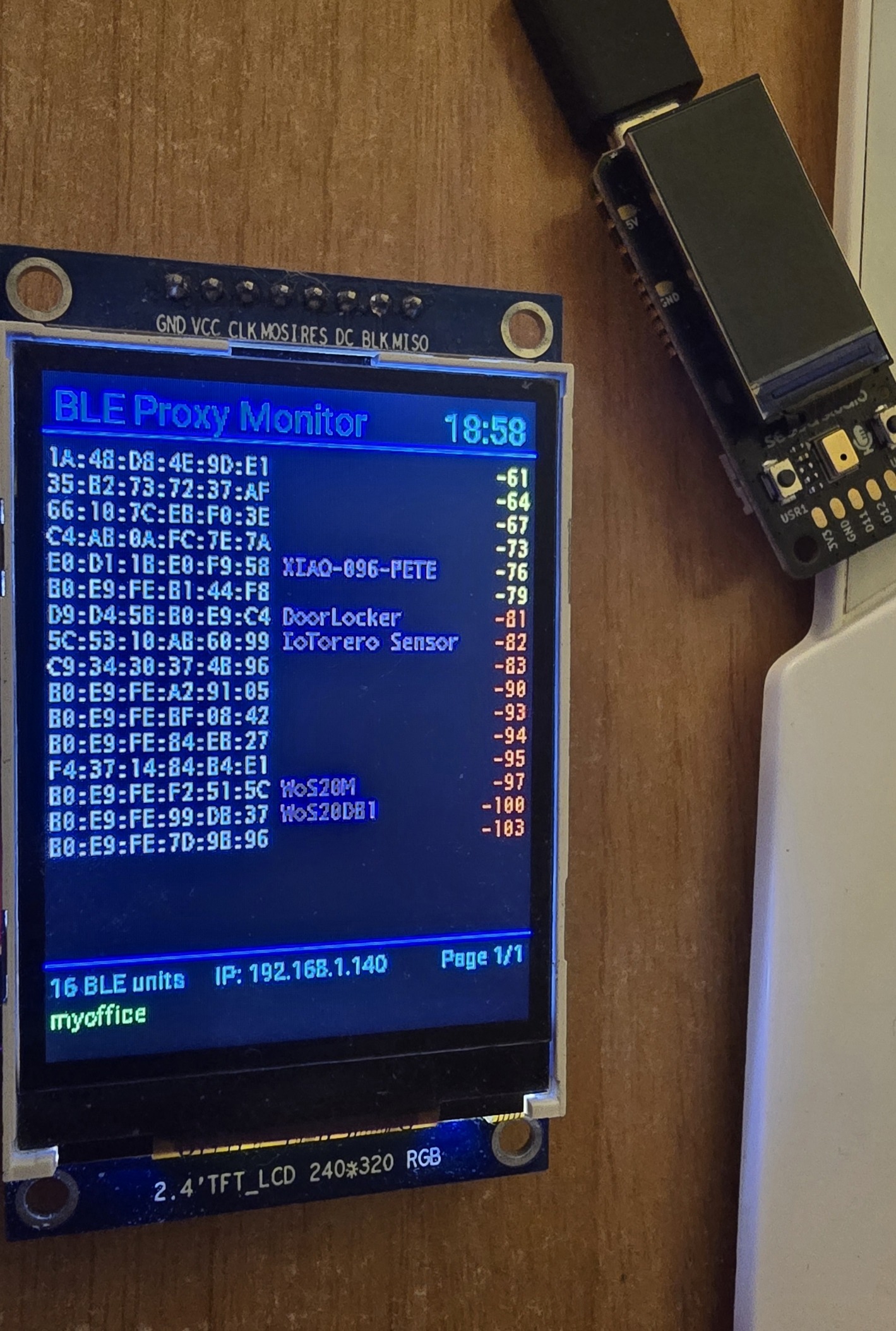
See that? XIAO-096-PETE near the top of the list at -76dBm – if only all BLE devices send a name as well as the MAC. That’s it – that’s all the little demo does – nothing else.. but that’s good enough to prove the point – I will be able to get info out of these boards and into Home Assistant.
So, sitting next to the proxy – why isn’t XIAO-096-PETE RIGHT at the top – well, I’ve lots of BT devices and antenna orientation is it seems important.. moving the little unit around it was easy to bring XIAO-096-PETE right to the top.
Although the XIAO nRF52840 Plus has Bluetooth Low Energy capability, the factory demonstration firmware does not appear to advertise the board as a BLE device. I confirmed this using both an Android BLE scanner and my own ESP32 BLE scanner. When I loaded a simple Arduino BLE advertising test, the board immediately became visible to both.
Remember that esphome does have an nrf52 platform. I don’t know if it supports these boards though. https://esphome.io/components/nrf52/
Yes, ESPHome does support the nRF52840, the real question is whether it has drivers for the various peripherals.
It also has support for Thread, Zigbee and Matter, which should do to get these boards speaking directly to Home Assistant via the pre-existing Zigbee2MQTT etc gateways Pete already has set up. These are much better for low power, battery operated purposes than an ESP32.