This article is generally about the Horrendous Oukitel P2001E and it’s DIRE app WONDERFREE. But Note the HA image above and read the updates and comments at the end… read about a Home Assistant solution, Grid Tie Invertors and more…
I’m using the Oukitel P2001E Lithium 2KW battery system and the app they had a third party create for them. No API, the app doesn’t work reliably – and there is NO support from either company. Here’s my original article covering generators and other stuff as well as the Oukitel.
I started all of this at the beginning of 2026 and when I LAST updated this blog in July there was still no other option than to use the horrendous “Wonderfree” app. I’d checked all over and no alternatives for the device and so chatGPT and I spent many hours working on reverse engineering the Bluetooth codes – with the alternative being to continue to suffer the unreliable app. No-one from Oukitel Power could then or can now can be bothered to help.
Should we have come up with an alternative to the app I’d planned to cover it in here, meanwhile my advice was and is -if you can afford it, go for a Bluetti – I borrowed one for the months that we had no mains power and it is more expensive but the overall experience is/was WAY better. Also, the Oukitel should support a pair of 400w solar panels for up to 800w out (40v – so well within its 60v voltage limits when running a pair in parallel) but I could NEVER get more than 350w or so out of the pair of 400w panels.
The Bluetti I borrowed would give up to 600w out of the same two paralleled panels – and since then I bought a grid-tie invertor (from Amazon – well under 150 euros on offer) to get the best out of the panels, 650w or more no problem (the theoretical max for the two panels in parallel is 800w but they are not directly facing the sun) – so why couldn’t the Oukitel “engineers” achieve that I wonder.
The grid-tie invertor is working and over the entire summer has been pumping out 650w or more from our two 400w panels – more than enough for general daytime electricity consumption (excluding washing machine, drier and 2 hot water tanks which ran on our generator until we got mains electricity and which now run overnight on Spanish cheap-rate electricity.
Update July 14, 2026: As far as the Wonderfree app is concerned, after much searching about – Wonderfree is not the clever bit, Wonderfree is “just” a React Native front-end sitting on top of the Acceleronix SDK. If that helps anyone – so be it… but ChatGPT and I spent a LOT of time on this and in the end, failed. See ChatGPT output in blue…
Look what we’ve established:
- ✅ Identified the cloud host:
iot-ws.acceleronix.io - ✅ Identified the AI host:
ai-chat.acceleronix.io - ✅ Found the WebSocket connection code.
- ✅ Found how one class authenticates (
Authorization=usr-...). - ✅ Confirmed the platform revolves around
productKeyanddeviceKey. - ✅ Confirmed this is a generic Acceleronix/Quectel platform.
Update July 16, 2026: After a promising start, ChatGPT gave up decoding the Wonderfree app / Outitel communications.. 2 days of solid graft, testing code and it just flat out gave up (NEVER believe AI promises). And that started me thinking – now I have mains power and the grid-tie invertor for my solar panels, do I really need to use the battery regularly or put it in a corner and schedule monthly checks in HA to see if it drops below 80% charge – reserving it for big power outages (my UPS will keep WiFi etc running through the odd 1 minute or less drop-out).
Update August 7, 2026 – Grid Tie Invertors
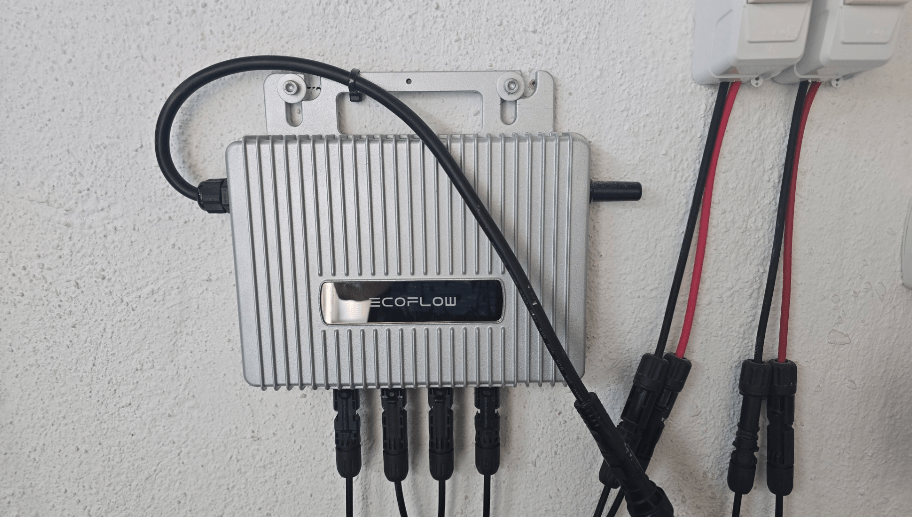
I said I’d write more once I got to grips with my new 800w Grid-Tie Invertor – well, it’s like this… the not-very-big but HEAVY unit plugs into my solar panels – two of them – 400w each – on separate cables – and then there’s a lead with a PLUG to plug into the mains – NO that’s not to take power OUT of the mains – it is to feed power back INTO the mains.. now if that sounds UTTERLY, UTTERLY counter-intuitive and even dangerous – it seemed that way to me until recently. But it WORKS and depending where you live, you might even be able to feed any excess back to your mains provider – but I’ll not get into that and I’m not doing that personally. Incidentally all cables came with the invertor.
There’s a YouTuber in the UK who is streets ahead of me on legislation and probably more – and I stumbled on his video by accident recently… it seems that with caviats the UK goverment is in the process of passing legislation to make the use of these devices legal in the UK (not that this has stopped anyone as I understand it). Anyway here’s the link to the video. Worth watching if you’re in the UK (I’m not). Quick takeaways – when the UK legislation is through it’ll be legal to buy a COMPLETE KIT and have it fitted by a qualified electrician (I’m not condoning it – just telling you what to expect). So it SEEMS that if you already have solar panels in the UK and fancy using one of these devices – it isn’t entirely clear if the law will be on your side? Good luck.
Update October 4, 2026 – The Oukitel Revisited – Home Assistant to the Rescue
Months ago as you’ll see above, armed with mains power, the nightmare Oukitel became a distant memory for me – until I just happened to be checking my “Comments to be approved” for the blog. If you’ve followed this because you have an Oukitel – meet your new best friend VICTOR..
Oukitel and Home Assistant – No More Rubbishy App – Wheeee
I was travelling this weekend and noted a pending comment from a gentleman who has reversed NOT the Bluetooth but the local connection between the Oukitel P2001 and the LAN – and created a Home Assistant integration that for me anyway works straight out of the box!! Thanks to having Tailscale VPN on my phone and router I can now access and control the Oukitel from my phone – NO PROBLEM – ANYWHERE using Home Assistant. I’ll leave readers to comment to Victor – he’s put the link to the Github repository for his integration – and note the 1-CLICK installation into HA. Note that within a day he’d updated the integration and improved it even further.
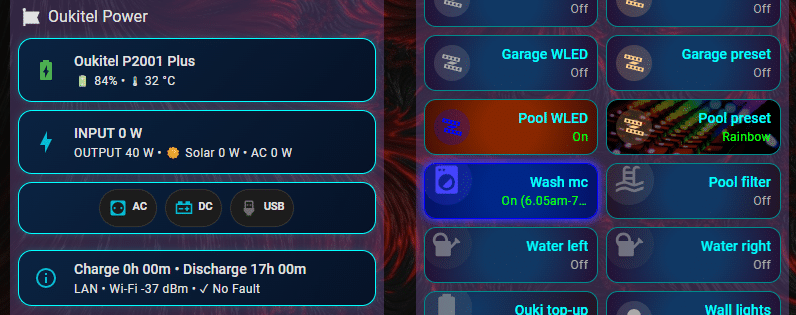
The image at the top of this article now shows my version of an HA dashboard entry using HA Mushroom cards – not for everyone but it’ll do me…
Hey everyone!
If you own an Oukitel Power Station (P2001 Plus, P5000, etc.) and use Home Assistant, you probably know how frustrating the 30-60 second cloud lag was for solar automations.
I reverse-engineered the local protocol over TCP/UDP and built a complete Home Assistant integration that gives you **real-time (~1s) local control**:
– **Local TCP binary stream:** Encrypted directly between HA and the station via Wi-Fi.
– **Automatic Discovery:** Finds your station on the local subnet via UDP broadcast.
– **Dual Mode:** Choose between Auto, LAN Only (100% local, no internet needed), or Cloud.
– **Full control:** AC 230V switch, DC 12V switch, USB switch, solar input telemetry, battery health, and temperature monitoring.
Repository: h***s://github.com/VictorCV-DAM/ha-oukitel
Hope this helps anyone looking to automate their home backup or campervan solar setup!
Hi Victor,
Tested – working – wonderful – I hope others benefit from this new integration. Well done.
Hi Peter,
Thank you for trusting me and confirming that the integration is working correctly. I sincerely appreciate your feedback.
I am trying to raise the project’s profile, so any comments or replies—whether on the repo or in the HA community—would be a huge help.
I forgot to attach the links 😅😅:
HA Community:
h***s://community.home-assistant.io/t/custom-integration-oukitel-power-stations-p2001-plus-p2001-p5000-bp2000-full-cloud-monitoring-control/1027025
Repository:
h***s://github.com/VictorCV-DAM/ha-oukitel
Call me thick – how would I leave a comment on the Github repository – I can see ISSUES and FEATURE RQUESTS but not general comments.
You’re not clumsy at all, GitHub is just weird for this because it doesn’t have a normal comment section.
You basically have two options:
Check if the repo has a Discussions tab at the top.
If it doesn’t, just open an Issue. I know it sounds like you’re reporting a bug, but people use them for general questions and comments all the time.
Just drop your message there and the creator will reply directly in the thread.
Thank you for your efforts, here is a github of someone that did some integration for Petron power stations which seems to use the same backend as Oukitel/Wonderfree.
h***s://github.com/jsight/ha-pecron
Maybe your AI quest will get some more info from that?
Good luck!
Thanks Francisco.
One more
h***s://github.com/bordeux/ha-oukitel-powerstation
Just tested this one, worked instantly 😀
I missed this somehow – anyway see the comment from Victor above – and I’ve checked his integration – it seems the community has once again come to the rescue when commercial companies have let us down!
I just recently bought this model and got interested in how to integrate it into my Home Assistant; I also have two Bluettis, and there were no issues with them. So I’m very interested in this topic, please keep me posted on your progress 🙏 For now, I’ve stopped at purchasing a Nordic nRF52840 Dongle for reverse engineering the Bluetooth codes.
Well now that’s interesting as I’ve just spent 2 solid days with chatGPT – there is no chance of getting any information out of Oukitel or the Wonderfree writers. We spent ages looking at Bluetooth protocols but it seems anyway that the Oukitel is talking to an Amazon server in Amsterdam somewhere. I know the address of the unit and its MAC address on my network and we’ve managed to decode three packages which show that if you turn USB on and off we know where that is in the code. It’s still very very vague. What I really want is to know:
– the battery percentage
– the power out
– the power in
– maybe turning AC on and off
Without using their app so I can get that into Home Assistant but we’re not there yet. A friend of mine has a Bluetti and their app works and they are helpful – Oukitel dont give two hoots and the App writers don’t care – their app is generic and talks to lots of devices – not just Oukitel – and is utterly unreliable. At the time I knew ZILCH about battery packs – mind you the Oukitel was on special at AliExpress for around 500 Euros – the same size Bluetti is a lot more expensive. ChatGPT and I got no-where.
Update October 2026 – look in here, at least TWO Home Assistant solutions – I’m using Victor’s.
Bluetti indeed handles all of this much better, and I wouldn’t mind buying a Bluetti, I already own two of their power stations. However, these Oukitel ones were available at a really good price, so I grabbed one because there’s no telling how much prices might spike. I’m in Ukraine, and power stations are extremely valuable here (due to blackouts caused by Russia’s shelling of our energy grid, and so on). In any case, thanks for the reply, I’ll be keeping an eye on your blog!
Well, we don’t have a tiny fraction of the issues you have any you have my full sympathy re: the evils of Russia’s government. I deal with SMLight and how they just keep going amazes me. Meanwhile back in Spain we don’t need foreign aggressor issues as we have enough incompetance of our own – here in rural Anadulusia (well, my little village of Galera anyway), the electriciy reliability is shall we say in the dark ages.
The power drops for a second or so pretty much every day (never an apology), maybe more and it affects my 5G broadband and equipment reliability (the routers are on the Oukitel).
Over the years I’d hate to think how much life-shortening it has done to various household devices… and the local 5g mast (where I get my broadband) goes down for a minute or two at least once a day. Annoying. I got up this morning and two or three of my Zigbee lights are offline for reasons I can only attribute to power. If I could go completely off-grid I would – but at my age I’d never recover the investment in doing the job properly. ChatGPT and I are still working on reverse engineering the Oukitel communications – third day coming up. What fun.
Update October 2026 – Not to overstate the matter – but in here are now at least two HA integrations which do the job – I’m using one of them. Goodbye Wonderfree – good riddance.