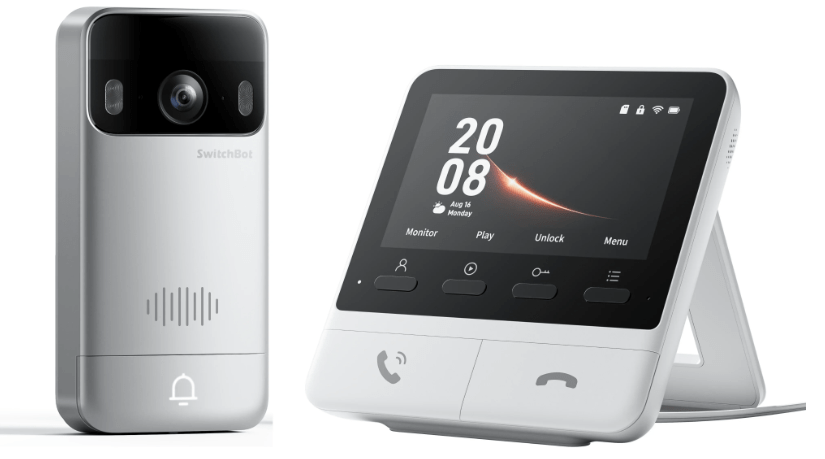
This new video doorbell has an indoor unit with 4.3″ (109mm) colour screen, a 2K camera with all the usual features you’ll see in the link below – along with in-depth specs. There’s likely a model number somewhere but I can’t find it.
This new super-duper video doorbell is looking to be the best doorbell I’ve had – and I’m not new to video doorbells… it comes with SEVEN separate manuals covering various European languages (6 of which are now in the bin as I only speak english).
How about 165 degree wide-angle coverage… and 5,000maH rechargeable battery in the bell unit.

Before I go any further, here’s the link Switchbot sent me – no I’m not on commission. I opened the very nice presentation box, plugged the monitor into the mains and pressed the doorbell – that’s IT – worked immediately with no setup – and there’s a supplied microSD SD in a side slot in the monitor unit. You can put in your own microSD in place of the one they supply if you want more storage. The door unit is USB-C rechargeable and you can apply power if planning to be away for long periods.

I pressed the solid-looking doorbell and a bell icon appeared on the otherwise dormant monitor – and a second later the video came in. Pressing the left button on the monitor I could start bidirectional audio. And remember – at this point I’d not set anything up. The doorbell is Matter-compatible and so I’ll get it running with the Switchbot app first then with Home Assistant..
As instructed, I hit + on the Switchbot app (making sure my phone Bluetooth was on) and held in both of the large buttons on the monitor unit. I then selected my nearest 2.4Ghz WiFi SSID – and it all just worked.

The next screen in the app tried to convince me to sign up for £2.99 a month to get cloud storage and AI-boosted motion detection. No thanks (though there is a 30-day free trial). I perfer to pay for things once and be done with it.
Next, I was greeted with current video output from the doorbell (nothing on the monitor – thats OK)…. and yes that is my ceiling on the left. I’ve not mounted the door camera/bell unit yet…
At this point the App announced that an important upgrade was on the way (I should point out that before I started any of this – I gave the doobell a couple of hours or so charge). 2 Minutes later the Doorbell updated, then seconds later the monitor did the same…. well, one had a green tick – the other said 100%. The screen continued to say “Upgrading” even though they both looked finished – so I left the app for another minute or so. Oh, 2 arrows… “Finish”. All done.
There are metal and plastic mounting posts included and you can mount with provided screws or adhesive pads – all supplied.
And with that, the basic setup and checking is complete – it really couldn’t get any easier. If you have the Switchbot Smart Lock – and an NFC card you can unlock your door via the doorbell. This just keeps getting better.
At first I was getting harrassed for the cloud storage every time I go to looked at an event. I did see something about built-in SD card on the monitor and went off to format the included card… formatting…. 3.74GB – I’ll probably put a 32GB card in and take the supplied one out… but for now, seconds after pressing the doorbell, one new event… and NOW I’m NOT getting cloud messages – very good.
NFC cards – did I get an NFC card?? NO. Do I need one? No. Lots of mounting templates – mounting bracket – screws, Allen key – USB-C lead… looks like they’ve thought of everything.
However as we are moving a few blocks soon – I guess mounting can wait. It all works. I like it.


Autofocus range is good and lag very low. Slight gripe up to now – in the app screen there’s a small label reminding me I’m not subscribed to the cloud service. Trivial I know but is that really necessary?
I didn’t get an NFC card with the unit – wasn’t expecting one – but I have one already and the manual makes reference to opening your Switchbot doorlock with the card, using the doorbell as the receptor. Well I can tell you that the doorbell unit beeps if you bring the card up to it. Right – trained – it’s in – just have to figure out what to do with it… Oh, “NFC card disabled due to multiple unlock events of unknown NFC cards”. That was me trying to pair the Switchbot card to the doorbell -. “Enable – operation failed – retry”. After a while it paired – then I asked the lock and doorbell to pair – that worked.
So that’s the doorbell running stand-alone and with the Switchbot app – all with very little effort (and all in perfectly clear English)
Soon I’ll tackle getting it running in Home Assistant….
This is more informative than anything else I’ve seen & that includes the maker’s manual. One thing I’m not clear about is: will it actually work as a doorbell using just the doorbell itself & the monitor? Or is it essential to also use their app on some 3rd device & go through that rigmarole?
This is more informative than anything else I’ve seen & that includes the maker’s manual. One thing I’m not clear about is: will it actually work as a doorbell using just the doorbell device & the monitor? Or is it essential to also use their app on some 3rd device & go through that rigmarole?
In time I’ll clarify that. For now, moving home, so stable electricity is the priority of the moment. Soon.
I should say that Switchbot generally have been very good for years…