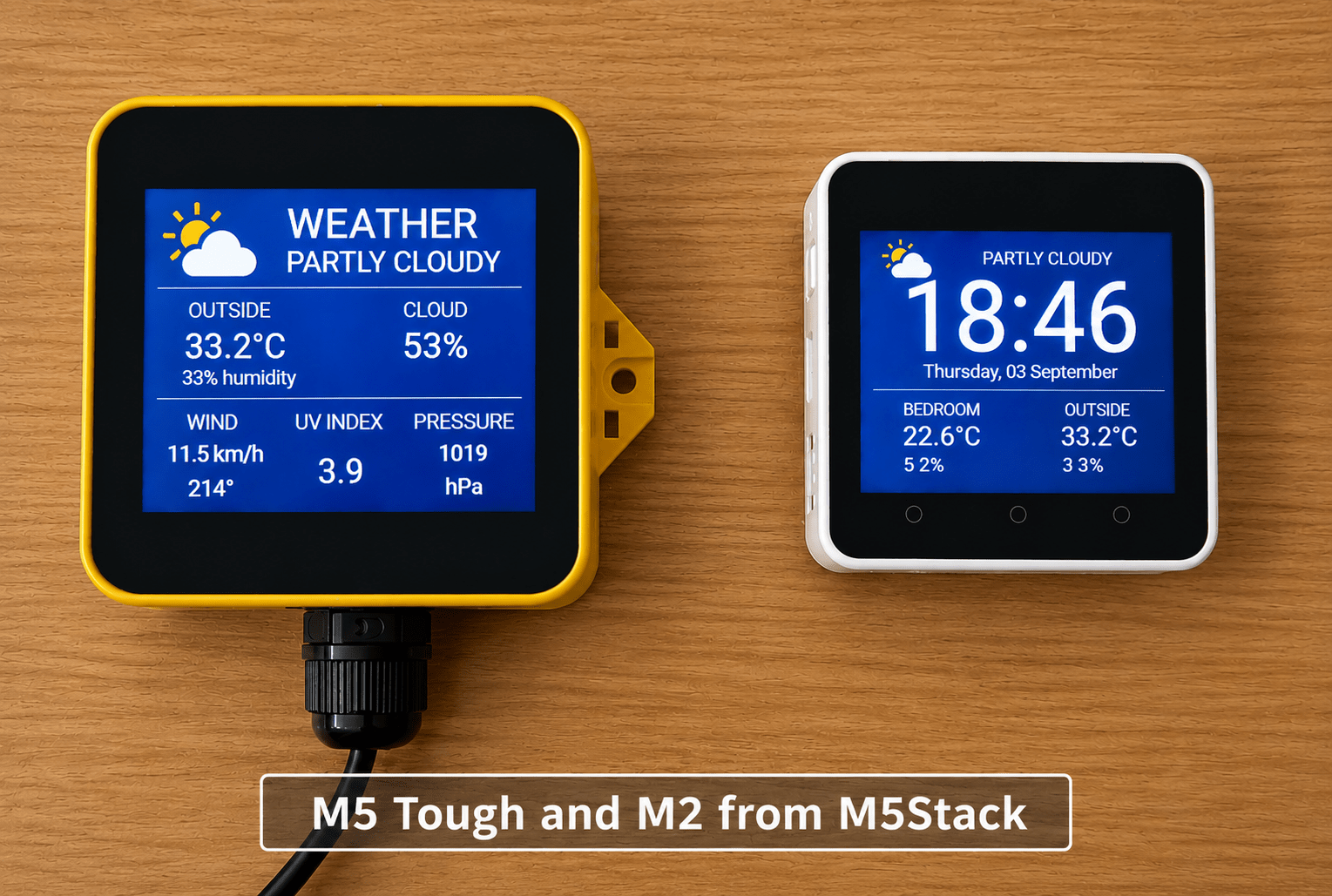
Years ago (2021) I ended up with a pair of rather different little M5Stack units — an M5 Tough and an M5Stack Core2/M2 — and yesterday decided they deserved something more interesting to do than sit around running demonstration software.
The answer was ESPHome.
The idea was simple enough: turn both units into compact, touch-sensitive information displays connected to Home Assistant. Of course, as is often the way with these things, the implementation became rather more involved — but the results have been worth it.
The larger M5 Tough has a touchscreen, which is now divided into simple control areas. Touch one side of the screen to move backwards through the information pages, the other side to move forwards, and the centre section toggles the display brightness.
The smaller M5Stack unit has three physical buttons (well, touch buttons anyway) along the bottom, so the same basic controls were adapted for those instead.
Both devices now display useful information from Home Assistant, including time, date, indoor and outdoor temperatures and humidity. There’s also a detailed weather page showing current conditions, cloud cover, wind, UV index and atmospheric pressure.
And because these are connected to Home Assistant, I couldn’t resist adding a more practical feature: an automatic 5G router warning page. If the router goes offline, the display switches to a rather obvious red alert screen and returns to whatever it was showing when the connection comes back.
What I particularly like about this project is that ESPHome makes these little devices genuinely useful without requiring a separate server or a complicated custom application. They become part of the existing Home Assistant setup and can display practically anything that Home Assistant knows about.
The two units are quite different physically, but the finished result is surprisingly consistent: a pair of smart little information displays that are always on, easy to read and easy to control.
And, naturally, now that they are working properly, I’ve started thinking of more pages to add…
For the sake of it, here is the code for the two of them – beware the code may be improved arbitrarily over time – and better self-documented – but it works – Core2 first then Tough.
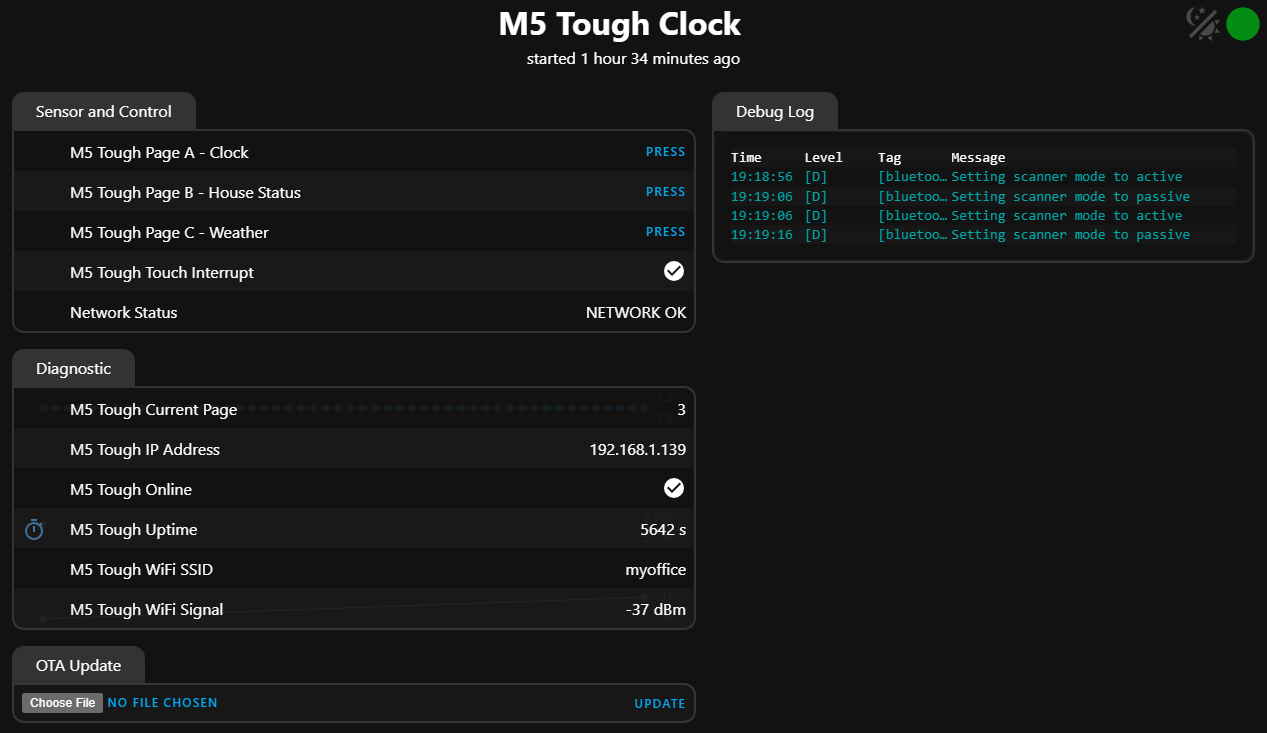
You may notice a trend in my recent ESPHOME blog entries – I’ve starting to put all my WiFi SSIDs in for when moving devices around. Oh and they both have WebUIs – current TOUGH WebUI shown below.
esphome:
name: core2-clock
friendly_name: Core2 Clock
on_boot:
priority: -100
then:
- delay: 10s
- lambda: |-
id(router_monitor_ready) = true;
esp32:
variant: esp32
flash_size: 16MB
framework:
type: arduino
psram:
mode: quad
speed: 80MHz
logger:
api:
ota:
- platform: esphome
wifi:
networks:
- ssid: !secret wifi_ssid
password: !secret wifi_password
- ssid: !secret wifi_ssid2
password: !secret wifi_password
- ssid: !secret wifi_ssid3
password: !secret wifi_password
- ssid: !secret wifi_ssid4
password: !secret wifi_password
- ssid: !secret wifi_ssid5
password: !secret wifi_password
power_save_mode: none
post_connect_roaming: true
ap:
ssid: "Core2 Clock Fallback"
password: "5uKWDKfAoKjs"
captive_portal:
# Web interface and OTA update page.
# Useful if the display or touchscreen ever stops responding.
web_server:
version: 3
local: true
button:
- platform: template
name: "Core2 Page A - Clock"
id: web_page_a
on_press:
then:
- lambda: |-
id(current_page) = 0;
# Display refreshes automatically every second.
- platform: template
name: "Core2 Page B - House Status"
id: web_page_b
on_press:
then:
- lambda: |-
id(current_page) = 1;
# Display refreshes automatically every second.
- platform: template
name: "Core2 Page C - Weather"
id: web_page_c
on_press:
then:
- lambda: |-
id(current_page) = 2;
# Display refreshes automatically every second.
external_components:
- source: github://martydingo/esphome-axp192
components: [axp192]
# BLE proxy
esp32_ble_tracker:
bluetooth_proxy:
active: true
globals:
- id: current_page
type: int
restore_value: no
initial_value: '0'
- id: previous_page
type: int
restore_value: no
initial_value: '0'
- id: router_alert_active
type: bool
restore_value: no
initial_value: 'false'
- id: router_state_received
type: bool
restore_value: no
initial_value: 'false'
- id: router_monitor_ready
type: bool
restore_value: no
initial_value: 'false'
i2c:
- id: bus_a
sda: GPIO21
scl: GPIO22
scan: true
touchscreen:
- platform: ft63x6
i2c_id: bus_a
interrupt_pin: GPIO39
binary_sensor:
# Network health monitors from Home Assistant
- platform: homeassistant
id: living_room_5g_router
name: "5G Router"
entity_id: binary_sensor.living_room_5g_router
entity_category: diagnostic
on_state:
then:
- lambda: |-
if (!id(router_monitor_ready)) {
return;
}
if (!x && !id(router_alert_active)) {
id(previous_page) = id(current_page);
id(router_alert_active) = true;
id(current_page) = 3;
ESP_LOGI(
"router_alert",
"5G router DOWN - switching to alert page"
);
} else if (x && id(router_alert_active)) {
id(current_page) = id(previous_page);
id(router_alert_active) = false;
ESP_LOGI(
"router_alert",
"5G router restored - returning to previous page"
);
}
- component.update: core2_display
- platform: homeassistant
id: internet_1_1_1_1
name: "Internet 1.1.1.1"
entity_id: binary_sensor.1_1_1_1
entity_category: diagnostic
- platform: homeassistant
id: living_room_smlight
name: "Living Room SMLIGHT"
entity_id: binary_sensor.living_room_smlight
entity_category: diagnostic
# En-suite bathroom hot water heater
- platform: homeassistant
id: ensuite_hot_water
name: "En-suite Hot Water"
entity_id: switch.athom_pg01_v2_2
# LEFT BUTTON - previous page
- platform: touchscreen
id: core2_button_a
x_min: 10
x_max: 120
y_min: 240
y_max: 280
use_raw: true
on_press:
then:
- lambda: |-
if (!id(router_alert_active)) {
id(current_page)--;
if (id(current_page) < 0) {
id(current_page) = 2;
}
ESP_LOGI("core2", "Page changed to %d", id(current_page));
}
- component.update: core2_display
# CENTRE BUTTON - dim / full brightness
- platform: touchscreen
id: core2_button_b
x_min: 130
x_max: 200
y_min: 240
y_max: 280
use_raw: true
on_press:
then:
- lambda: |-
static bool dimmed = false;
uint16_t mv;
if (!dimmed) {
// DIM
mv = 2600;
dimmed = true;
ESP_LOGI("core2", "Backlight DIM");
} else {
// FULL
mv = 3300;
dimmed = false;
ESP_LOGI("core2", "Backlight FULL");
}
// AXP192 DCDC3 voltage control.
uint8_t reg = 0x27;
uint8_t setting =
(uint8_t)((mv - 700) / 25);
uint8_t output[2] = {
reg,
setting
};
id(bus_a).write(
0x34,
output,
2
);
# RIGHT BUTTON - next page
- platform: touchscreen
id: core2_button_c
x_min: 230
x_max: 310
y_min: 240
y_max: 280
use_raw: true
on_press:
then:
- lambda: |-
if (!id(router_alert_active)) {
id(current_page)++;
if (id(current_page) > 2) {
id(current_page) = 0;
}
ESP_LOGI("core2", "Page changed to %d", id(current_page));
}
- component.update: core2_display
spi:
clk_pin: GPIO18
mosi_pin: GPIO23
sensor:
# Diagnostics
- platform: wifi_signal
name: "Core2 WiFi Signal"
id: core2_wifi_signal
update_interval: 60s
entity_category: diagnostic
- platform: uptime
name: "Core2 Uptime"
id: core2_uptime
entity_category: diagnostic
- platform: template
name: "Core2 Current Page"
id: core2_current_page
accuracy_decimals: 0
update_interval: 1s
entity_category: diagnostic
lambda: |-
return id(current_page) + 1;
# Detailed weather attributes
- platform: homeassistant
id: weather_wind_speed
entity_id: weather.forecast_home
attribute: wind_speed
- platform: homeassistant
id: weather_wind_bearing
entity_id: weather.forecast_home
attribute: wind_bearing
- platform: homeassistant
id: weather_uv_index
entity_id: weather.forecast_home
attribute: uv_index
- platform: homeassistant
id: weather_pressure
entity_id: weather.forecast_home
attribute: pressure
- platform: homeassistant
id: weather_cloud_coverage
entity_id: weather.forecast_home
attribute: cloud_coverage
# Keep the AXP192 component for Core2 power/display initialisation.
- platform: axp192
model: M5CORE2
address: 0x34
i2c_id: bus_a
update_interval: 60s
# Bedroom
- platform: homeassistant
id: bedroom_temperature
name: "Bedroom Temperature"
entity_id: sensor.airguard_th_temperature
- platform: homeassistant
id: bedroom_humidity
name: "Bedroom Humidity"
entity_id: sensor.airguard_th_humidity
# Outside
- platform: homeassistant
id: outside_temperature
name: "Outside Temperature"
entity_id: sensor.outdoor_meter_65_temperature
- platform: homeassistant
id: outside_humidity
name: "Outside Humidity"
entity_id: sensor.outdoor_meter_65_humidity
# Kitchen CO₂
- platform: homeassistant
id: kitchen_co2
name: "Kitchen CO2"
entity_id: sensor.meter_pro_co2_monitor_d6_carbon_dioxide
# Garage CO₂
- platform: homeassistant
id: garage_co2
name: "Garage CO2"
entity_id: sensor.meter_pro_co2_monitor_new_carbon_dioxide
text_sensor:
# Diagnostics visible in the web interface
- platform: wifi_info
ip_address:
name: "Core2 IP Address"
id: core2_ip_address
entity_category: diagnostic
- platform: homeassistant
id: weather_condition
name: "Weather Condition"
entity_id: weather.forecast_home
- platform: template
id: network_status
name: "Network Status"
update_interval: 10s
lambda: |-
if (!id(living_room_5g_router).state) {
return {"5G ROUTER DOWN"};
} else if (!id(internet_1_1_1_1).state) {
return {"INTERNET DOWN"};
} else if (!id(living_room_smlight).state) {
return {"ZIGBEE OFFLINE"};
} else {
return {"NETWORK OK"};
}
time:
- platform: sntp
id: clock_time
timezone: Europe/Madrid
servers:
- time.google.com
- time.cloudflare.com
- pool.ntp.org
update_interval: 1h
font:
- file: "gfonts://Roboto"
id: clock_font
size: 96
- file: "gfonts://Roboto"
id: date_font
size: 18
- file: "gfonts://Roboto"
id: label_font
size: 16
- file: "gfonts://Roboto"
id: value_font
size: 26
- file: "gfonts://Roboto"
id: weather_font
size: 36
- file: "fonts/materialdesignicons-webfont.ttf"
id: weather_icon
size: 32
glyphs:
- "\U000F0599" # sunny
- "\U000F0590" # cloudy
- "\U000F0595" # partly cloudy
- "\U000F0597" # rainy
- "\U000F0596" # pouring
- "\U000F0593" # lightning
- "\U000F067E" # lightning rainy
- "\U000F0594" # clear night
- "\U000F0591" # fog
- "\U000F058E" # water / humidity
display:
- platform: mipi_spi
id: core2_display
model: M5CORE2
update_interval: 1s
lambda: |-
// Background
it.fill(Color(5, 8, 20));
int page = id(current_page);
// =================================================
// PAGE A - MAIN CLOCK
// =================================================
if (page == 0) {
auto now = id(clock_time).now();
if (!now.is_valid()) {
it.print(
160, 120,
id(date_font),
Color(255, 255, 255),
TextAlign::CENTER,
"WAITING FOR TIME"
);
} else {
// ---------------------------------------------
// WEATHER
// ---------------------------------------------
std::string weather = id(weather_condition).state;
std::string weather_text = "WEATHER";
const char *weather_glyph = "\U000F0590";
if (weather == "sunny") {
weather_text = "SUNNY";
weather_glyph = "\U000F0599";
} else if (weather == "partlycloudy") {
weather_text = "PARTLY CLOUDY";
weather_glyph = "\U000F0595";
} else if (weather == "cloudy") {
weather_text = "CLOUDY";
weather_glyph = "\U000F0590";
} else if (weather == "rainy") {
weather_text = "RAIN";
weather_glyph = "\U000F0597";
} else if (weather == "pouring") {
weather_text = "HEAVY RAIN";
weather_glyph = "\U000F0596";
} else if (weather == "lightning") {
weather_text = "STORM";
weather_glyph = "\U000F0593";
} else if (weather == "lightning-rainy") {
weather_text = "STORM";
weather_glyph = "\U000F067E";
} else if (weather == "clear-night") {
weather_text = "CLEAR NIGHT";
weather_glyph = "\U000F0594";
} else if (weather == "fog") {
weather_text = "FOG";
weather_glyph = "\U000F0591";
}
// Weather icon - left side
it.print(
35, 10,
id(weather_icon),
Color(100, 190, 255),
TextAlign::TOP_LEFT,
weather_glyph
);
// Weather description
it.print(
190, 28,
id(label_font),
Color(180, 220, 255),
TextAlign::CENTER,
weather_text.c_str()
);
// ---------------------------------------------
// BIG CENTRALISED CLOCK
// ---------------------------------------------
it.strftime(
160, 27,
id(clock_font),
Color(255, 255, 255),
TextAlign::TOP_CENTER,
"%H:%M",
now
);
// Date
it.strftime(
160, 125,
id(date_font),
Color(160, 190, 220),
TextAlign::TOP_CENTER,
"%A, %d %B",
now
);
// Divider
it.line(
10, 150,
310, 150,
Color(40, 100, 140)
);
// ---------------------------------------------
// NETWORK WARNING - only shown when there is
// a problem, so the clock normally stays clean.
// ---------------------------------------------
if (!id(living_room_5g_router).state) {
it.print(
160, 143,
id(label_font),
Color(255, 90, 90),
TextAlign::BOTTOM_CENTER,
"5G ROUTER DOWN"
);
} else if (!id(internet_1_1_1_1).state) {
it.print(
160, 143,
id(label_font),
Color(255, 90, 90),
TextAlign::BOTTOM_CENTER,
"INTERNET DOWN"
);
} else if (!id(living_room_smlight).state) {
it.print(
160, 143,
id(label_font),
Color(255, 180, 0),
TextAlign::BOTTOM_CENTER,
"ZIGBEE OFFLINE"
);
}
// ---------------------------------------------
// BEDROOM
// ---------------------------------------------
it.print(
80, 158,
id(label_font),
Color(120, 200, 255),
TextAlign::TOP_CENTER,
"BEDROOM"
);
if (!isnan(id(bedroom_temperature).state)) {
it.printf(
80, 174,
id(value_font),
Color(255, 255, 255),
TextAlign::TOP_CENTER,
"%.1f°C",
id(bedroom_temperature).state
);
}
if (!isnan(id(bedroom_humidity).state)) {
it.print(
42, 214,
id(weather_icon),
Color(100, 180, 220),
TextAlign::CENTER,
"\U000F058E"
);
it.printf(
62, 214,
id(label_font),
Color(100, 180, 220),
TextAlign::CENTER_LEFT,
"%.0f%%",
id(bedroom_humidity).state
);
}
// ---------------------------------------------
// OUTSIDE
// ---------------------------------------------
it.print(
240, 158,
id(label_font),
Color(120, 200, 255),
TextAlign::TOP_CENTER,
"OUTSIDE"
);
if (!isnan(id(outside_temperature).state)) {
it.printf(
240, 174,
id(value_font),
Color(255, 255, 255),
TextAlign::TOP_CENTER,
"%.1f°C",
id(outside_temperature).state
);
}
if (!isnan(id(outside_humidity).state)) {
it.print(
202, 214,
id(weather_icon),
Color(100, 180, 220),
TextAlign::CENTER,
"\U000F058E"
);
it.printf(
222, 214,
id(label_font),
Color(100, 180, 220),
TextAlign::CENTER_LEFT,
"%.0f%%",
id(outside_humidity).state
);
}
} // End valid time
} // End Page A
// =================================================
// PAGE B - HOUSE STATUS
// =================================================
else if (page == 1) {
it.print(
160, 12,
id(weather_font),
Color(120, 200, 255),
TextAlign::TOP_CENTER,
"HOUSE STATUS"
);
// ---------------------------------------------
// CO2 READINGS
// ---------------------------------------------
it.print(
80, 55,
id(label_font),
Color(120, 200, 255),
TextAlign::TOP_CENTER,
"KITCHEN CO2"
);
if (!isnan(id(kitchen_co2).state)) {
it.printf(
80, 78,
id(value_font),
Color(255, 255, 255),
TextAlign::TOP_CENTER,
"%.0f ppm",
id(kitchen_co2).state
);
} else {
it.print(
80, 78,
id(label_font),
Color(255, 120, 120),
TextAlign::TOP_CENTER,
"NO DATA"
);
}
it.print(
240, 55,
id(label_font),
Color(120, 200, 255),
TextAlign::TOP_CENTER,
"GARAGE CO2"
);
if (!isnan(id(garage_co2).state)) {
it.printf(
240, 78,
id(value_font),
Color(255, 255, 255),
TextAlign::TOP_CENTER,
"%.0f ppm",
id(garage_co2).state
);
} else {
it.print(
240, 78,
id(label_font),
Color(255, 120, 120),
TextAlign::TOP_CENTER,
"NO DATA"
);
}
it.line(15, 110, 305, 110, Color(40, 100, 140));
// ---------------------------------------------
// NETWORK HEALTH
// ---------------------------------------------
it.print(
160, 118,
id(label_font),
Color(120, 200, 255),
TextAlign::TOP_CENTER,
"NETWORK HEALTH"
);
// Internet
it.print(
35, 150,
id(label_font),
id(internet_1_1_1_1).state ? Color(100, 220, 120) : Color(255, 90, 90),
TextAlign::CENTER_LEFT,
id(internet_1_1_1_1).state ? "OK" : "DOWN"
);
it.print(
150, 150,
id(label_font),
Color(220, 220, 220),
TextAlign::CENTER,
"INTERNET"
);
// Zigbee coordinator
it.print(
35, 170,
id(label_font),
id(living_room_smlight).state ? Color(100, 220, 120) : Color(255, 180, 0),
TextAlign::CENTER_LEFT,
id(living_room_smlight).state ? "OK" : "OFFLINE"
);
it.print(
150, 170,
id(label_font),
Color(220, 220, 220),
TextAlign::CENTER,
"ZIGBEE"
);
// 5G router
it.print(
35, 190,
id(label_font),
id(living_room_5g_router).state ? Color(100, 220, 120) : Color(255, 90, 90),
TextAlign::CENTER_LEFT,
id(living_room_5g_router).state ? "OK" : "DOWN"
);
it.print(
150, 190,
id(label_font),
Color(220, 220, 220),
TextAlign::CENTER,
"5G ROUTER"
);
// ---------------------------------------------
// EN-SUITE HOT WATER
// Kept as a compact fourth status row so it
// does not collide with the page indicators.
// ---------------------------------------------
it.print(
140, 212,
id(label_font),
Color(220, 220, 220),
TextAlign::CENTER,
"EN-SUITE HOT WATER"
);
it.print(
270, 212,
id(label_font),
id(ensuite_hot_water).state ? Color(100, 220, 120) : Color(180, 180, 180),
TextAlign::CENTER,
id(ensuite_hot_water).state ? "ON" : "OFF"
);
}
// =================================================
// PAGE C - WEATHER
// Detailed forecast to be added next.
// =================================================
else if (page == 2) {
// =================================================
// PAGE C - DETAILED WEATHER
// =================================================
std::string weather = id(weather_condition).state;
std::string weather_text = weather;
if (weather == "partlycloudy") {
weather_text = "PARTLY CLOUDY";
} else if (weather == "clear-night") {
weather_text = "CLEAR NIGHT";
} else if (weather == "sunny") {
weather_text = "SUNNY";
} else if (weather == "cloudy") {
weather_text = "CLOUDY";
} else if (weather == "rainy") {
weather_text = "RAIN";
} else if (weather == "pouring") {
weather_text = "HEAVY RAIN";
} else if (weather == "fog") {
weather_text = "FOG";
} else if (weather == "unavailable" ||
weather == "unknown" ||
weather.empty()) {
weather_text = "NO WEATHER DATA";
} else {
for (auto &c : weather_text) {
if (c == '_') c = ' ';
if (c == '-') c = ' ';
c = toupper(static_cast<unsigned char>(c));
}
}
it.print(
160, 10,
id(weather_font),
Color(120, 200, 255),
TextAlign::TOP_CENTER,
"WEATHER"
);
it.print(
160, 48,
id(value_font),
Color(255, 255, 255),
TextAlign::TOP_CENTER,
weather_text.c_str()
);
it.line(
10, 78,
310, 78,
Color(40, 100, 140)
);
// OUTSIDE CONDITIONS
it.print(
80, 86,
id(label_font),
Color(120, 200, 255),
TextAlign::TOP_CENTER,
"OUTSIDE"
);
if (!isnan(id(outside_temperature).state)) {
it.printf(
80, 106,
id(value_font),
Color(255, 255, 255),
TextAlign::TOP_CENTER,
"%.1f°C",
id(outside_temperature).state
);
}
if (!isnan(id(outside_humidity).state)) {
it.printf(
80, 136,
id(label_font),
Color(100, 180, 220),
TextAlign::TOP_CENTER,
"%.0f%% humidity",
id(outside_humidity).state
);
}
// CLOUD COVER
it.print(
240, 86,
id(label_font),
Color(120, 200, 255),
TextAlign::TOP_CENTER,
"CLOUD"
);
if (!isnan(id(weather_cloud_coverage).state)) {
it.printf(
240, 106,
id(value_font),
Color(255, 255, 255),
TextAlign::TOP_CENTER,
"%.0f%%",
id(weather_cloud_coverage).state
);
}
it.line(
10, 160,
310, 160,
Color(40, 100, 140)
);
// WIND
it.print(
55, 168,
id(label_font),
Color(120, 200, 255),
TextAlign::TOP_CENTER,
"WIND"
);
if (!isnan(id(weather_wind_speed).state)) {
it.printf(
55, 188,
id(label_font),
Color(255, 255, 255),
TextAlign::TOP_CENTER,
"%.1f km/h",
id(weather_wind_speed).state
);
}
if (!isnan(id(weather_wind_bearing).state)) {
it.printf(
55, 212,
id(label_font),
Color(180, 220, 255),
TextAlign::TOP_CENTER,
"%.0f°",
id(weather_wind_bearing).state
);
}
// UV INDEX
it.print(
160, 168,
id(label_font),
Color(120, 200, 255),
TextAlign::TOP_CENTER,
"UV INDEX"
);
if (!isnan(id(weather_uv_index).state)) {
it.printf(
160, 196,
id(value_font),
Color(255, 255, 255),
TextAlign::TOP_CENTER,
"%.1f",
id(weather_uv_index).state
);
}
// PRESSURE
it.print(
265, 168,
id(label_font),
Color(120, 200, 255),
TextAlign::TOP_CENTER,
"PRESSURE"
);
if (!isnan(id(weather_pressure).state)) {
it.printf(
265, 190,
id(label_font),
Color(255, 255, 255),
TextAlign::TOP_CENTER,
"%.0f",
id(weather_pressure).state
);
it.print(
265, 212,
id(label_font),
Color(180, 220, 255),
TextAlign::TOP_CENTER,
"hPa"
);
}
}
// =================================================
// PAGE D - 5G ROUTER ALERT
// =================================================
else if (page == 3) {
it.filled_rectangle(
0, 0,
320, 48,
Color(220, 0, 0)
);
it.print(
160, 24,
id(value_font),
Color(255, 255, 255),
TextAlign::CENTER,
"!!! ALERT !!!"
);
it.print(
160, 82,
id(weather_font),
Color(255, 40, 40),
TextAlign::TOP_CENTER,
"5G ROUTER"
);
it.print(
160, 120,
id(weather_font),
Color(255, 40, 40),
TextAlign::TOP_CENTER,
"DOWN"
);
it.line(
25, 168,
295, 168,
Color(220, 0, 0)
);
it.print(
160, 172,
id(label_font),
Color(255, 180, 180),
TextAlign::TOP_CENTER,
"INTERNET CONNECTION"
);
it.print(
160, 192,
id(label_font),
Color(255, 180, 180),
TextAlign::TOP_CENTER,
"MAY BE UNAVAILABLE"
);
it.print(
160, 230,
id(label_font),
Color(255, 80, 80),
TextAlign::BOTTOM_CENTER,
"WAITING FOR ROUTER..."
);
}
and now the Tough…
esphome:
name: m5-tough-clock
friendly_name: M5 Tough Clock
esp32:
variant: esp32
flash_size: 16MB
framework:
type: arduino
psram:
mode: quad
speed: 80MHz
logger:
api:
ota:
- platform: esphome
wifi:
networks:
- ssid: !secret wifi_ssid
password: !secret wifi_password
- ssid: !secret wifi_ssid2
password: !secret wifi_password
- ssid: !secret wifi_ssid3
password: !secret wifi_password
- ssid: !secret wifi_ssid4
password: !secret wifi_password
- ssid: !secret wifi_ssid5
password: !secret wifi_password
power_save_mode: none
post_connect_roaming: true
ap:
ssid: "M5 Tough Clock Fallback"
password: "5uKWDKfAoKjs"
captive_portal:
# Web interface and OTA update page.
# Useful if the display or touchscreen ever stops responding.
web_server:
version: 3
local: true
button:
- platform: template
name: "M5 Tough Page A - Clock"
id: web_page_a
on_press:
then:
- lambda: |-
id(current_page) = 0;
# Display refreshes automatically every second.
- platform: template
name: "M5 Tough Page B - House Status"
id: web_page_b
on_press:
then:
- lambda: |-
id(current_page) = 1;
# Display refreshes automatically every second.
- platform: template
name: "M5 Tough Page C - Weather"
id: web_page_c
on_press:
then:
- lambda: |-
id(current_page) = 2;
# Display refreshes automatically every second.
external_components:
- source: github://martydingo/esphome-axp192
components: [axp192]
# BLE proxy
esp32_ble_tracker:
bluetooth_proxy:
active: true
globals:
- id: current_page
type: int
restore_value: no
initial_value: '0'
- id: touch_was_down
type: bool
restore_value: no
initial_value: 'false'
- id: touch_start_x
type: int
restore_value: no
initial_value: '0'
- id: touch_start_y
type: int
restore_value: no
initial_value: '0'
- id: touch_last_x
type: int
restore_value: no
initial_value: '0'
- id: previous_page
type: int
restore_value: no
initial_value: '0'
- id: router_alert_active
type: bool
restore_value: no
initial_value: 'false'
# M5 Tough hardware:
# I2C: GPIO21/GPIO22
# LCD: ILI9342C on SPI GPIO23/GPIO18, CS GPIO5, DC GPIO15
# The AXP192 component performs the Tough-specific LCD power/reset setup.
i2c:
- id: bus_a
sda: GPIO21
scl: GPIO22
scan: true
# M5 Tough capacitive touchscreen
# CHSC6540 detected on I2C address 0x2E.
interval:
- interval: 50ms
then:
- lambda: |-
uint8_t reg = 0x00;
uint8_t data[7];
if (id(bus_a).write_readv(
0x2E,
®,
1,
data,
7
) == i2c::ERROR_OK) {
bool touched = (data[2] != 0);
if (touched) {
uint16_t x =
((uint16_t)(data[3] & 0x0F) << 8) |
data[4];
uint16_t y =
((uint16_t)(data[5] & 0x0F) << 8) |
data[6];
// Only act once when the finger first
// touches the screen.
if (!id(touch_was_down)) {
// Only use the bottom third of the screen.
if (y >= 160 && !id(router_alert_active)) {
// BOTTOM LEFT THIRD = previous page.
if (x < 107) {
id(current_page)--;
if (id(current_page) < 0) {
id(current_page) = 2;
}
}
// BOTTOM RIGHT THIRD = next page.
else if (x >= 213) {
id(current_page)++;
if (id(current_page) > 2) {
id(current_page) = 0;
}
}
// BOTTOM CENTRE THIRD = dim/full brightness.
else {
static bool dimmed = false;
uint8_t axp_reg = 0x28;
uint8_t axp_data = 0x00;
if (id(bus_a).write_readv(
0x34,
&axp_reg,
1,
&axp_data,
1
) == i2c::ERROR_OK) {
dimmed = !dimmed;
// Full brightness = 3.0V
// Dim brightness = 2.6V
axp_data =
(axp_data & 0xF0) |
(dimmed ? 0x08 : 0x0C);
uint8_t output[2] = {
0x28,
axp_data
};
id(bus_a).write(
0x34,
output,
2
);
}
}
}
}
id(touch_was_down) = true;
} else {
id(touch_was_down) = false;
}
}
binary_sensor:
- platform: gpio
name: "M5 Tough Touch Interrupt"
id: tough_touch_interrupt
pin:
number: GPIO39
mode:
input: true
on_press:
then:
- logger.log: "GPIO39 TOUCH DETECTED"
- platform: status
name: "M5 Tough Online"
id: tough_online
entity_category: diagnostic
# Network health monitors from Home Assistant
- platform: homeassistant
id: living_room_5g_router
name: "5G Router"
entity_id: binary_sensor.living_room_5g_router
entity_category: diagnostic
on_state:
then:
- lambda: |-
ESP_LOGI(
"ha_network",
"living_room_5g_router = %s",
x ? "ON" : "OFF"
);
// Router has gone down.
if (!x && !id(router_alert_active)) {
// Remember whichever normal page was being viewed.
id(previous_page) = id(current_page);
// Activate the alert page.
id(router_alert_active) = true;
id(current_page) = 3;
ESP_LOGI(
"router_alert",
"5G router DOWN - switching to alert page"
);
}
// Router has recovered.
else if (x && id(router_alert_active)) {
// Return to the page that was being viewed.
id(current_page) = id(previous_page);
// Clear the alert.
id(router_alert_active) = false;
ESP_LOGI(
"router_alert",
"5G router restored - returning to previous page"
);
}
// Router has gone down.
if (!x && !id(router_alert_active)) {
// Remember whichever normal page was being viewed.
id(previous_page) = id(current_page);
// Activate the alert page.
id(router_alert_active) = true;
id(current_page) = 3;
ESP_LOGI(
"router_alert",
"5G router DOWN - switching to alert page"
);
}
// Router has recovered.
else if (x && id(router_alert_active)) {
// Return to the page that was being viewed.
id(current_page) = id(previous_page);
// Clear the alert.
id(router_alert_active) = false;
ESP_LOGI(
"router_alert",
"5G router restored - returning to previous page"
);
}
- platform: homeassistant
id: internet_1_1_1_1
name: "Internet 1.1.1.1"
entity_id: binary_sensor.1_1_1_1
entity_category: diagnostic
on_state:
then:
- lambda: |-
ESP_LOGI("ha_network", "internet_1_1_1_1 = %s", x ? "ON" : "OFF");
- platform: homeassistant
id: living_room_smlight
name: "Living Room SMLIGHT"
entity_id: binary_sensor.living_room_smlight
entity_category: diagnostic
on_state:
then:
- lambda: |-
ESP_LOGI("ha_network", "living_room_smlight = %s", x ? "ON" : "OFF");
# En-suite bathroom hot water heater
- platform: homeassistant
id: ensuite_hot_water
name: "En-suite Hot Water"
entity_id: switch.athom_pg01_v2_2
spi:
clk_pin: GPIO18
mosi_pin: GPIO23
sensor:
# Diagnostics
- platform: wifi_signal
name: "M5 Tough WiFi Signal"
id: core2_wifi_signal
update_interval: 60s
entity_category: diagnostic
- platform: uptime
name: "M5 Tough Uptime"
id: core2_uptime
entity_category: diagnostic
- platform: template
name: "M5 Tough Current Page"
id: core2_current_page
accuracy_decimals: 0
update_interval: 1s
entity_category: diagnostic
lambda: |-
return id(current_page) + 1;
# AXP192 power/display initialisation for the M5 Tough.
- platform: axp192
model: M5TOUGH
address: 0x34
i2c_id: bus_a
id: axp192_id
update_interval: 60s
# Bedroom
- platform: homeassistant
id: bedroom_temperature
name: "Bedroom Temperature"
entity_id: sensor.airguard_th_temperature
on_value:
then:
- lambda: |-
ESP_LOGI("ha_data", "bedroom_temperature = %.2f", x);
- platform: homeassistant
id: bedroom_humidity
name: "Bedroom Humidity"
entity_id: sensor.airguard_th_humidity
on_value:
then:
- lambda: |-
ESP_LOGI("ha_data", "bedroom_humidity = %.2f", x);
# Outside
- platform: homeassistant
id: outside_temperature
name: "Outside Temperature"
entity_id: sensor.outdoor_meter_65_temperature
on_value:
then:
- lambda: |-
ESP_LOGI("ha_data", "outside_temperature = %.2f", x);
- platform: homeassistant
id: outside_humidity
name: "Outside Humidity"
entity_id: sensor.outdoor_meter_65_humidity
on_value:
then:
- lambda: |-
ESP_LOGI("ha_data", "outside_humidity = %.2f", x);
# Met.no weather details
- platform: homeassistant
id: weather_wind_speed
name: "Weather Wind Speed"
entity_id: weather.forecast_home
attribute: wind_speed
- platform: homeassistant
id: weather_wind_bearing
name: "Weather Wind Bearing"
entity_id: weather.forecast_home
attribute: wind_bearing
- platform: homeassistant
id: weather_cloud_coverage
name: "Weather Cloud Coverage"
entity_id: weather.forecast_home
attribute: cloud_coverage
- platform: homeassistant
id: weather_uv_index
name: "Weather UV Index"
entity_id: weather.forecast_home
attribute: uv_index
- platform: homeassistant
id: weather_pressure
name: "Weather Pressure"
entity_id: weather.forecast_home
attribute: pressure
# Kitchen CO₂
- platform: homeassistant
id: kitchen_co2
name: "Kitchen CO2"
entity_id: sensor.meter_pro_co2_monitor_d6_carbon_dioxide
on_value:
then:
- lambda: |-
ESP_LOGI("ha_data", "kitchen_co2 = %.2f", x);
# Garage CO₂
- platform: homeassistant
id: garage_co2
name: "Garage CO2"
entity_id: sensor.meter_pro_co2_monitor_new_carbon_dioxide
on_value:
then:
- lambda: |-
ESP_LOGI("ha_data", "garage_co2 = %.2f", x);
text_sensor:
# Diagnostics visible in the web interface
- platform: wifi_info
ip_address:
name: "M5 Tough IP Address"
id: core2_ip_address
entity_category: diagnostic
ssid:
name: "M5 Tough WiFi SSID"
id: tough_wifi_ssid
entity_category: diagnostic
- platform: homeassistant
id: weather_condition
name: "Weather Condition"
entity_id: weather.forecast_home
on_value:
then:
- lambda: |-
ESP_LOGI("ha_data", "weather_condition = %s", x.c_str());
- platform: template
id: network_status
name: "Network Status"
update_interval: 10s
lambda: |-
// Diagnostic note: these are Home Assistant entity states.
// Page C shows each raw input separately.
if (!id(living_room_5g_router).state) {
return {"5G ROUTER DOWN"};
} else if (!id(internet_1_1_1_1).state) {
return {"INTERNET DOWN"};
} else if (!id(living_room_smlight).state) {
return {"ZIGBEE OFFLINE"};
} else {
return {"NETWORK OK"};
}
time:
- platform: sntp
id: clock_time
timezone: Europe/Madrid
servers:
- time.google.com
- time.cloudflare.com
- pool.ntp.org
update_interval: 1h
font:
- file: "gfonts://Roboto"
id: clock_font
size: 96
- file: "gfonts://Roboto"
id: date_font
size: 18
- file: "gfonts://Roboto"
id: label_font
size: 16
- file: "gfonts://Roboto"
id: value_font
size: 26
- file: "gfonts://Roboto"
id: weather_font
size: 36
- file: "fonts/materialdesignicons-webfont.ttf"
id: weather_icon
size: 32
glyphs:
- "\U000F0599" # sunny
- "\U000F0590" # cloudy
- "\U000F0595" # partly cloudy
- "\U000F0597" # rainy
- "\U000F0596" # pouring
- "\U000F0593" # lightning
- "\U000F067E" # lightning rainy
- "\U000F0594" # clear night
- "\U000F0591" # fog
- "\U000F058E" # water / humidity
display:
- platform: ili9xxx
id: tough_display
# The M5STACK model uses the M5-specific ILI9342C initialisation.
# This is the current ili9xxx equivalent of the configuration
# recommended by the M5 Tough AXP192 component.
model: M5STACK
cs_pin: GPIO5
dc_pin: GPIO15
# The Tough photo showed normal geometry but mirrored text.
# Start with the M5STACK model's native orientation rather than
# layering another transform over the controller initialisation.
invert_colors: true
color_order: BGR
auto_clear_enabled: true
data_rate: 40MHz
update_interval: 1s
lambda: |-
// Background
it.fill(Color(5, 8, 20));
int page = id(current_page);
// =================================================
// PAGE A - MAIN CLOCK
// =================================================
if (page == 0) {
auto now = id(clock_time).now();
if (!now.is_valid()) {
it.print(
160, 120,
id(date_font),
Color(255, 255, 255),
TextAlign::CENTER,
"WAITING FOR TIME"
);
} else {
// ---------------------------------------------
// WEATHER
// ---------------------------------------------
std::string weather = id(weather_condition).state;
std::string weather_text = weather;
const char *weather_glyph = "\U000F0590";
// Convert Home Assistant weather states into readable text.
if (weather == "sunny") {
weather_text = "SUNNY";
weather_glyph = "\U000F0599";
} else if (weather == "partlycloudy") {
weather_text = "PARTLY CLOUDY";
weather_glyph = "\U000F0595";
} else if (weather == "cloudy") {
weather_text = "CLOUDY";
weather_glyph = "\U000F0590";
} else if (weather == "rainy") {
weather_text = "RAIN";
weather_glyph = "\U000F0597";
} else if (weather == "pouring") {
weather_text = "HEAVY RAIN";
weather_glyph = "\U000F0596";
} else if (weather == "lightning") {
weather_text = "STORM";
weather_glyph = "\U000F0593";
} else if (weather == "lightning-rainy") {
weather_text = "STORM";
weather_glyph = "\U000F067E";
} else if (weather == "clear-night") {
weather_text = "CLEAR NIGHT";
weather_glyph = "\U000F0594";
} else if (weather == "fog") {
weather_text = "FOG";
weather_glyph = "\U000F0591";
} else if (weather == "unknown" || weather == "unavailable" || weather.empty()) {
weather_text = "NO WEATHER DATA";
} else {
// Show the actual Home Assistant state rather than the old
// hard-coded fallback of "WEATHER".
for (auto &c : weather_text) {
if (c == '-') c = ' ';
}
for (auto &c : weather_text) {
c = toupper(static_cast<unsigned char>(c));
}
}
// Weather icon - left side
it.print(
35, 8,
id(weather_icon),
Color(100, 190, 255),
TextAlign::TOP_LEFT,
weather_glyph
);
// Weather description - kept above the clock.
it.print(
190, 8,
id(label_font),
Color(180, 220, 255),
TextAlign::TOP_CENTER,
weather_text.c_str()
);
// ---------------------------------------------
// BIG CENTRALISED CLOCK
// ---------------------------------------------
it.strftime(
160, 32,
id(clock_font),
Color(255, 255, 255),
TextAlign::TOP_CENTER,
"%H:%M",
now
);
// Date
it.strftime(
160, 128,
id(date_font),
Color(160, 190, 220),
TextAlign::TOP_CENTER,
"%A, %d %B",
now
);
// Divider
it.line(
10, 150,
310, 150,
Color(40, 100, 140)
);
// Network health is shown on the House Status page.
// Keeping the main clock page clear avoids overlap with the date.
// ---------------------------------------------
// BEDROOM
// ---------------------------------------------
it.print(
80, 158,
id(label_font),
Color(120, 200, 255),
TextAlign::TOP_CENTER,
"BEDROOM"
);
if (!isnan(id(bedroom_temperature).state)) {
it.printf(
80, 174,
id(value_font),
Color(255, 255, 255),
TextAlign::TOP_CENTER,
"%.1f°C",
id(bedroom_temperature).state
);
}
if (!isnan(id(bedroom_humidity).state)) {
it.print(
42, 214,
id(weather_icon),
Color(100, 180, 220),
TextAlign::CENTER,
"\U000F058E"
);
it.printf(
62, 214,
id(label_font),
Color(100, 180, 220),
TextAlign::CENTER_LEFT,
"%.0f%%",
id(bedroom_humidity).state
);
}
// ---------------------------------------------
// OUTSIDE
// ---------------------------------------------
it.print(
240, 158,
id(label_font),
Color(120, 200, 255),
TextAlign::TOP_CENTER,
"OUTSIDE"
);
if (!isnan(id(outside_temperature).state)) {
it.printf(
240, 174,
id(value_font),
Color(255, 255, 255),
TextAlign::TOP_CENTER,
"%.1f°C",
id(outside_temperature).state
);
}
if (!isnan(id(outside_humidity).state)) {
it.print(
202, 214,
id(weather_icon),
Color(100, 180, 220),
TextAlign::CENTER,
"\U000F058E"
);
it.printf(
222, 214,
id(label_font),
Color(100, 180, 220),
TextAlign::CENTER_LEFT,
"%.0f%%",
id(outside_humidity).state
);
}
} // End valid time
} // End Page A
// =================================================
// PAGE B - HOUSE STATUS
// =================================================
else if (page == 1) {
it.print(
160, 12,
id(weather_font),
Color(120, 200, 255),
TextAlign::TOP_CENTER,
"HOUSE STATUS"
);
// ---------------------------------------------
// CO2 READINGS
// ---------------------------------------------
it.print(
80, 55,
id(label_font),
Color(120, 200, 255),
TextAlign::TOP_CENTER,
"KITCHEN CO2"
);
if (!isnan(id(kitchen_co2).state)) {
it.printf(
80, 78,
id(value_font),
Color(255, 255, 255),
TextAlign::TOP_CENTER,
"%.0f ppm",
id(kitchen_co2).state
);
} else {
it.print(
80, 78,
id(label_font),
Color(255, 120, 120),
TextAlign::TOP_CENTER,
"NO DATA"
);
}
it.print(
240, 55,
id(label_font),
Color(120, 200, 255),
TextAlign::TOP_CENTER,
"GARAGE CO2"
);
if (!isnan(id(garage_co2).state)) {
it.printf(
240, 78,
id(value_font),
Color(255, 255, 255),
TextAlign::TOP_CENTER,
"%.0f ppm",
id(garage_co2).state
);
} else {
it.print(
240, 78,
id(label_font),
Color(255, 120, 120),
TextAlign::TOP_CENTER,
"NO DATA"
);
}
it.line(15, 110, 305, 110, Color(40, 100, 140));
// ---------------------------------------------
// NETWORK HEALTH
// ---------------------------------------------
it.print(
160, 118,
id(label_font),
Color(120, 200, 255),
TextAlign::TOP_CENTER,
"NETWORK HEALTH"
);
// Internet
it.print(
35, 150,
id(label_font),
id(internet_1_1_1_1).state ? Color(100, 220, 120) : Color(255, 90, 90),
TextAlign::CENTER_LEFT,
id(internet_1_1_1_1).state ? "OK" : "DOWN"
);
it.print(
150, 150,
id(label_font),
Color(220, 220, 220),
TextAlign::CENTER,
"INTERNET"
);
// Zigbee coordinator
it.print(
35, 170,
id(label_font),
id(living_room_smlight).state ? Color(100, 220, 120) : Color(255, 180, 0),
TextAlign::CENTER_LEFT,
id(living_room_smlight).state ? "OK" : "OFFLINE"
);
it.print(
150, 170,
id(label_font),
Color(220, 220, 220),
TextAlign::CENTER,
"ZIGBEE"
);
// 5G router
it.print(
35, 190,
id(label_font),
id(living_room_5g_router).state ? Color(100, 220, 120) : Color(255, 90, 90),
TextAlign::CENTER_LEFT,
id(living_room_5g_router).state ? "OK" : "DOWN"
);
it.print(
150, 190,
id(label_font),
Color(220, 220, 220),
TextAlign::CENTER,
"5G ROUTER"
);
// ---------------------------------------------
// EN-SUITE HOT WATER
// Kept as a compact fourth status row so it
// does not collide with the page indicators.
// ---------------------------------------------
it.print(
140, 212,
id(label_font),
Color(220, 220, 220),
TextAlign::CENTER,
"EN-SUITE HOT WATER"
);
it.print(
270, 212,
id(label_font),
id(ensuite_hot_water).state ? Color(100, 220, 120) : Color(180, 180, 180),
TextAlign::CENTER,
id(ensuite_hot_water).state ? "ON" : "OFF"
);
}
// =================================================
// PAGE C - WEATHER
// =================================================
else if (page == 2) {
it.print(
160, 8,
id(weather_font),
Color(120, 200, 255),
TextAlign::TOP_CENTER,
"WEATHER"
);
std::string weather = id(weather_condition).state;
std::string weather_text = weather;
if (weather == "partlycloudy") {
weather_text = "PARTLY CLOUDY";
} else if (weather == "clear-night") {
weather_text = "CLEAR NIGHT";
} else if (weather == "lightning-rainy") {
weather_text = "STORM";
} else if (weather == "sunny") {
weather_text = "SUNNY";
} else if (weather == "cloudy") {
weather_text = "CLOUDY";
} else if (weather == "rainy") {
weather_text = "RAIN";
} else if (weather == "pouring") {
weather_text = "HEAVY RAIN";
} else if (weather == "fog") {
weather_text = "FOG";
} else if (weather == "unavailable" ||
weather == "unknown" ||
weather.empty()) {
weather_text = "NO WEATHER DATA";
} else {
for (auto &c : weather_text) {
if (c == '_') c = ' ';
if (c == '-') c = ' ';
c = toupper(static_cast<unsigned char>(c));
}
}
it.print(
160, 48,
id(value_font),
Color(255, 255, 255),
TextAlign::TOP_CENTER,
weather_text.c_str()
);
it.line(
10, 78,
310, 78,
Color(40, 100, 140)
);
// LOCAL OUTSIDE CONDITIONS
it.print(
80, 86,
id(label_font),
Color(120, 200, 255),
TextAlign::TOP_CENTER,
"OUTSIDE"
);
if (!isnan(id(outside_temperature).state)) {
it.printf(
80, 106,
id(value_font),
Color(255, 255, 255),
TextAlign::TOP_CENTER,
"%.1f°C",
id(outside_temperature).state
);
}
if (!isnan(id(outside_humidity).state)) {
it.printf(
80, 136,
id(label_font),
Color(100, 180, 220),
TextAlign::TOP_CENTER,
"%.0f%% humidity",
id(outside_humidity).state
);
}
// MET.NO CLOUD COVERAGE
it.print(
240, 86,
id(label_font),
Color(120, 200, 255),
TextAlign::TOP_CENTER,
"CLOUD"
);
if (!isnan(id(weather_cloud_coverage).state)) {
it.printf(
240, 106,
id(value_font),
Color(255, 255, 255),
TextAlign::TOP_CENTER,
"%.0f%%",
id(weather_cloud_coverage).state
);
}
it.line(
10, 160,
310, 160,
Color(40, 100, 140)
);
// WIND
it.print(
55, 168,
id(label_font),
Color(120, 200, 255),
TextAlign::TOP_CENTER,
"WIND"
);
if (!isnan(id(weather_wind_speed).state)) {
it.printf(
55, 188,
id(label_font),
Color(255, 255, 255),
TextAlign::TOP_CENTER,
"%.1f km/h",
id(weather_wind_speed).state
);
}
if (!isnan(id(weather_wind_bearing).state)) {
it.printf(
55, 212,
id(label_font),
Color(180, 220, 255),
TextAlign::TOP_CENTER,
"%.0f°",
id(weather_wind_bearing).state
);
}
// UV INDEX
it.print(
160, 168,
id(label_font),
Color(120, 200, 255),
TextAlign::TOP_CENTER,
"UV INDEX"
);
if (!isnan(id(weather_uv_index).state)) {
it.printf(
160, 196,
id(value_font),
Color(255, 255, 255),
TextAlign::TOP_CENTER,
"%.1f",
id(weather_uv_index).state
);
}
// PRESSURE
it.print(
265, 168,
id(label_font),
Color(120, 200, 255),
TextAlign::TOP_CENTER,
"PRESSURE"
);
if (!isnan(id(weather_pressure).state)) {
it.printf(
265, 190,
id(label_font),
Color(255, 255, 255),
TextAlign::TOP_CENTER,
"%.0f",
id(weather_pressure).state
);
it.print(
265, 212,
id(label_font),
Color(180, 220, 255),
TextAlign::TOP_CENTER,
"hPa"
);
}
}
// =================================================
// PAGE D - 5G ROUTER ALERT
// =================================================
else if (page == 3) {
// Top red alert banner.
it.filled_rectangle(
0, 0,
320, 48,
Color(220, 0, 0)
);
it.print(
160, 24,
id(value_font),
Color(255, 255, 255),
TextAlign::CENTER,
"!!! ALERT !!!"
);
// Main warning.
it.print(
160, 82,
id(weather_font),
Color(255, 40, 40),
TextAlign::TOP_CENTER,
"5G ROUTER"
);
it.print(
160, 120,
id(weather_font),
Color(255, 40, 40),
TextAlign::TOP_CENTER,
"DOWN"
);
// Warning divider.
it.line(
25, 168,
295, 168,
Color(220, 0, 0)
);
it.print(
160, 172,
id(label_font),
Color(255, 180, 180),
TextAlign::TOP_CENTER,
"INTERNET CONNECTION"
);
it.print(
160, 192,
id(label_font),
Color(255, 180, 180),
TextAlign::TOP_CENTER,
"MAY BE UNAVAILABLE"
);
// Bottom status message.
it.print(
160, 230,
id(label_font),
Color(255, 80, 80),
TextAlign::BOTTOM_CENTER,
"WAITING FOR ROUTER..."
);
}